
ERR_TOO_MANY_REDIRECTS is the error Chrome shows when a page keeps sending the browser to another address that eventually sends it back again. Firefox and Safari show their own wording for the same problem. On a WordPress site it usually appears right after a change: installing SSL, switching on a CDN, moving to a new host, or editing the site URL.
The good news is that the cause is almost always one of a handful of settings that disagree with each other. This guide shows how to trace the loop, find which layer is causing it, and fix it without guessing.
The Short Answer
A redirect loop happens when two rules undo each other, for example one layer sends visitors from HTTP to HTTPS while another sends them from HTTPS back to HTTP. Browsers stop after a number of hops and show the error, as MDN explains in its guide to HTTP redirections.
On WordPress the most common causes are Cloudflare set to Flexible SSL while the server also forces HTTPS, a proxy or load balancer that hides HTTPS from WordPress, a mismatch between the WordPress Address and Site Address, duplicate redirect rules in .htaccess or a plugin, and stale cookies or cache. Clear your cookies first, trace the redirect chain with curl, then fix the one layer that is sending visitors in a circle.
What Causes ERR_TOO_MANY_REDIRECTS in WordPress?
A request to a WordPress site can pass through several layers, and any of them can issue a redirect: the browser (which remembers HSTS and cached redirects), a CDN or proxy such as Cloudflare, the web server (Apache .htaccess or Nginx config), WordPress core itself, and plugins. The loop appears when two of those layers have a different idea of what the “correct” URL is.
| Cause | Typical trigger | Where to fix it |
|---|---|---|
| Cloudflare Flexible SSL plus a server-side HTTPS redirect | Turning on Cloudflare after installing SSL at the host | Cloudflare SSL/TLS mode, or the origin redirect |
| WordPress cannot see HTTPS behind a proxy or load balancer | Moving to a host or setup with a reverse proxy | wp-config.php (X-Forwarded-Proto check) |
| Site URL settings disagree with how the site is actually served | Editing Settings › General, or a migration | WP_HOME / WP_SITEURL or the database |
| www and non-www rules point at each other | A host rule and a plugin each pick a different version | One canonical rule in one place |
| Duplicate redirect rules | An SSL plugin, a redirect plugin and .htaccess all redirecting | Remove all but one |
| Stale cookies, browser cache or page cache | Any of the above, even after it has been fixed | Clear cookies and purge caches |
Step by Step: How to Fix the Redirect Loop
Work through these steps in order. Each one either fixes the problem or rules out a layer, so you are not changing several things at once.
Step 1: Rule out your browser
Open the page in a private window, or clear cookies for your domain only. WordPress login cookies and cached redirects can keep a loop alive after the real cause has been fixed. If the site loads in a private window, the problem is local to your browser and clearing cookies and cache for the site is enough.
Step 2: Trace the redirect chain
Before changing settings, see exactly where the loop goes. From a terminal, curl prints each hop and its Location header:
curl -sIL --max-redirs 10 https://example.com/ | grep -iE "^(HTTP|location|server)"Read the output as a list of hops. If the addresses alternate between http:// and https://, the problem is a protocol mismatch (steps 3 and 4). If they alternate between www and non-www, or between two paths, it is a URL setting or rule conflict (steps 5 and 6). The server line often tells you whether the redirect came from Cloudflare or from your own server.
Step 3: Check the Cloudflare SSL/TLS mode
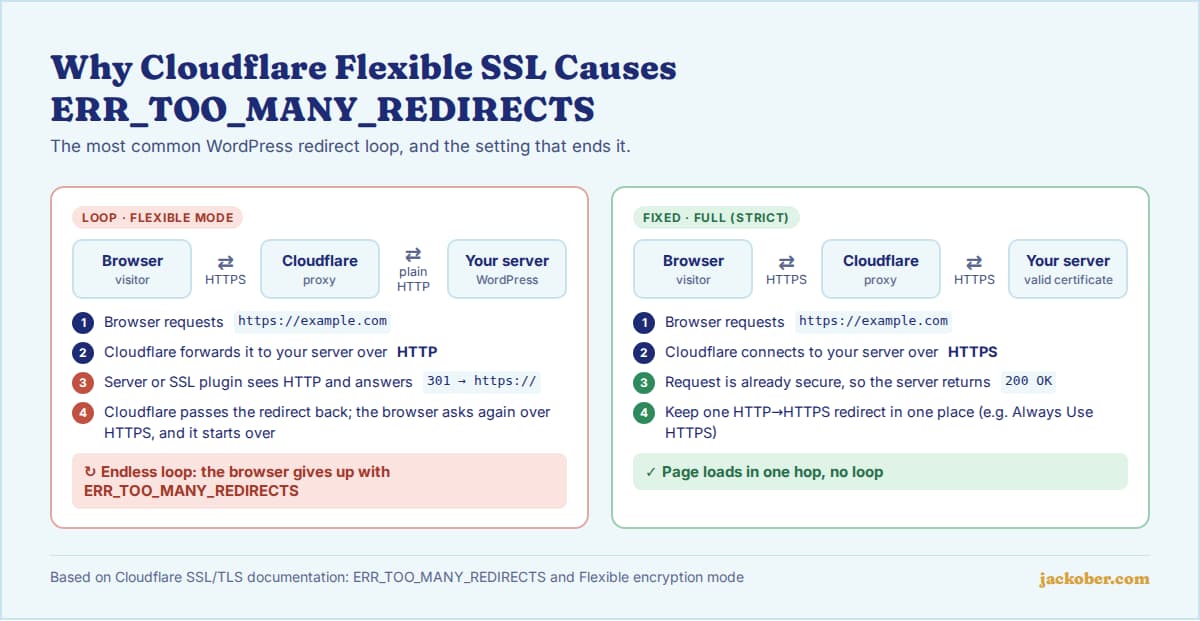
This is the single most common cause on sites behind Cloudflare. In Flexible mode, Cloudflare talks to your server over plain HTTP. If your server or an SSL plugin redirects every HTTP request to HTTPS, Cloudflare receives a redirect, passes it to the browser, the browser asks again over HTTPS, and the cycle repeats. Cloudflare documents this exact loop and advises against Flexible mode when the origin forces HTTPS.
The fix is to install a certificate on your server (most hosts provide a free one) and set the mode to Full (strict), or Full if your origin certificate is self-signed. If you want Cloudflare to handle the HTTP to HTTPS redirect, turn on Always Use HTTPS and remove duplicate redirects elsewhere. Also check Cloudflare redirect rules and Page Rules for anything that points back at the original URL. Our CDN setup tutorial covers the rest of a clean Cloudflare configuration.
Step 4: Tell WordPress it is running on HTTPS behind a proxy
WordPress decides whether a request is secure with is_ssl(), which looks at server variables such as $_SERVER['HTTPS']. Behind a reverse proxy or load balancer that ends the HTTPS connection, those variables can say “not secure” even though the visitor used HTTPS. If WordPress is set to an https:// address, it keeps redirecting to HTTPS and never sees that it has arrived.
The WordPress HTTPS documentation gives the fix: add this to wp-config.php above the line that says “That’s all, stop editing”, assuming your proxy sends the X-Forwarded-Proto header.
if ( isset( $_SERVER['HTTP_X_FORWARDED_PROTO'] ) && strpos( $_SERVER['HTTP_X_FORWARDED_PROTO'], 'https' ) !== false ) {
    $_SERVER['HTTPS'] = 'on';
}
Using strpos() instead of an exact match helps where the header contains a list of values. Only add this when your site really sits behind a proxy you control, and ask your host if you are unsure.
Step 5: Make the site URLs match
The WordPress Address (URL) and Site Address (URL) must use the same protocol and the same www or non-www version that the rest of your stack serves. If you are locked out of wp-admin, set them in wp-config.php as described in Editing wp-config.php:
define( 'WP_HOME', 'https://example.com' );
define( 'WP_SITEURL', 'https://example.com' );
Include https:// and leave off the trailing slash. These constants override the database values, so the General settings fields become read-only while they are in place. With command-line access you can update the stored values instead using wp option update home and wp option update siteurl. After a move, follow the URL steps in our WordPress migration guide as well.
Step 6: Remove duplicate redirect rules
Open .htaccess (on Apache) and compare it with the default WordPress rules. Look for extra RewriteRule lines that force HTTPS or www, then check your SSL plugin, redirect plugin, security plugin and hosting panel for the same setting. Keep exactly one place responsible for each redirect. Back up the file first (see how to back up a WordPress site), and on Nginx ask your host to check the server block.
Step 7: Deactivate plugins if the loop is still there
If the loop affects only some URLs or only wp-admin, a plugin is a likely culprit. Rename the wp-content/plugins folder over SFTP or your file manager to deactivate everything at once, check the site, then rename it back and reactivate plugins one by one. Redirect, SSL, caching, security, multilingual and membership plugins are the usual suspects.
Step 8: Purge every cache
Once the fix is in, purge your caching plugin, your host’s server cache and your CDN cache, then test again in a private window. A cached redirect can make a fixed site still look broken. If you are not sure which cache layers you have, our roundup of WordPress cache plugins explains how they work.
Quick Diagnosis Table
| If you see this | Then check this first |
|---|---|
| Loop started right after turning on Cloudflare | SSL/TLS mode set to Flexible (step 3) |
| curl shows http and https alternating, no Cloudflare | Proxy or load balancer hiding HTTPS (step 4), or an HTTP site URL (step 5) |
| curl shows www and non-www alternating | Site URL settings versus host or plugin rules (steps 5 and 6) |
Only /wp-admin/ or /wp-login.php loops | Login cookies, FORCE_SSL_ADMIN without working HTTPS, or a security plugin (steps 1, 4, 7) |
| Loop started after a migration | Old URLs in the database and leftover rules (steps 5 and 6) |
| Works in a private window only | Cookies and browser cache (step 1) |
Common Mistakes
- Fixing the same redirect in three places. An SSL plugin,
.htaccessand Cloudflare all forcing HTTPS is how many loops start. - Switching Cloudflare to Full (strict) before the server has a valid certificate, which swaps the redirect loop for an SSL error.
- Turning on HSTS while HTTPS is still unstable. Cloudflare warns that browsers will refuse plain HTTP for the whole max-age period, so only enable it once everything works.
- Adding
WP_HOMEandWP_SITEURLwith a trailing slash or the wrong protocol. - Editing
.htaccessorwp-config.phpwithout a backup copy to restore. - Testing in the same browser session without clearing cookies, then assuming the fix failed.
Frequently Asked Questions
Is ERR_TOO_MANY_REDIRECTS bad for SEO?
Yes, while it lasts. Search engines cannot reach a page that loops, so it cannot be crawled or indexed. A short outage that you fix quickly is unlikely to cause lasting harm, but a loop left in place can lead to pages dropping out of the index.
Can a visitor fix this error themselves?
Only when the cause is on their side, such as stale cookies. Clearing cookies for the site or trying a private window is worth a try. If the loop happens for everyone, only the site owner can fix it.
Why does only wp-admin have a redirect loop?
The admin area depends on login cookies and on WordPress correctly detecting HTTPS. Old cookies, FORCE_SSL_ADMIN on a setup where WordPress cannot see HTTPS, or a security plugin that moves the login page are the usual causes.
Which Cloudflare SSL mode should WordPress use?
Full (strict) with a valid certificate on your server is the most secure choice. Flexible leaves the connection between Cloudflare and your server unencrypted and is the mode most likely to cause loops when the server also forces HTTPS, according to Cloudflare.
How many redirects does it take to trigger the error?
Browsers set their own limits and do not all use the same number, so it is better to aim for zero loops and as few hops as possible. A clean setup sends HTTP or the non-canonical host to the final HTTPS URL in a single hop.
The Bottom Line
ERR_TOO_MANY_REDIRECTS is a disagreement between layers, not a mystery. Clear cookies, trace the chain with curl, and then fix the layer that is wrong: Cloudflare SSL mode, HTTPS detection behind a proxy, site URLs, or duplicate rules. Keep one place in charge of each redirect, and if you are setting up HTTPS from scratch, follow our guide to adding SSL to WordPress so the loop does not come back.
Sources & Further Reading
- Cloudflare SSL/TLS docs: ERR_TOO_MANY_REDIRECTS
- Cloudflare SSL/TLS docs: Flexible encryption mode
- Cloudflare SSL/TLS docs: Always Use HTTPS
- Cloudflare SSL/TLS docs: HTTP Strict Transport Security
- WordPress Advanced Administration: HTTPS
- WordPress Advanced Administration: Editing wp-config.php
- WordPress Advanced Administration: Apache HTTPD / .htaccess
- WordPress Code Reference: is_ssl()
- WP-CLI: wp option
- MDN Web Docs: Redirections in HTTP
Jackober uses AI tools for research, drafting, and editing. Articles are editorially reviewed and factual claims are checked against cited sources. Last reviewed: October 2026.