
Schema markup is code that describes what a page is about in a format search engines can read without guessing: this is an article, written by this person, published by this organisation, on this date. On WordPress most of it is generated for you by an SEO plugin, which is both convenient and a common source of confusion.
The rules have also changed a lot. Google has retired several rich result types since 2023, including FAQ rich results in 2026. This guide explains which schema types still matter for a WordPress site, what your SEO plugin already does, and how to add and test anything extra.
The Short Answer
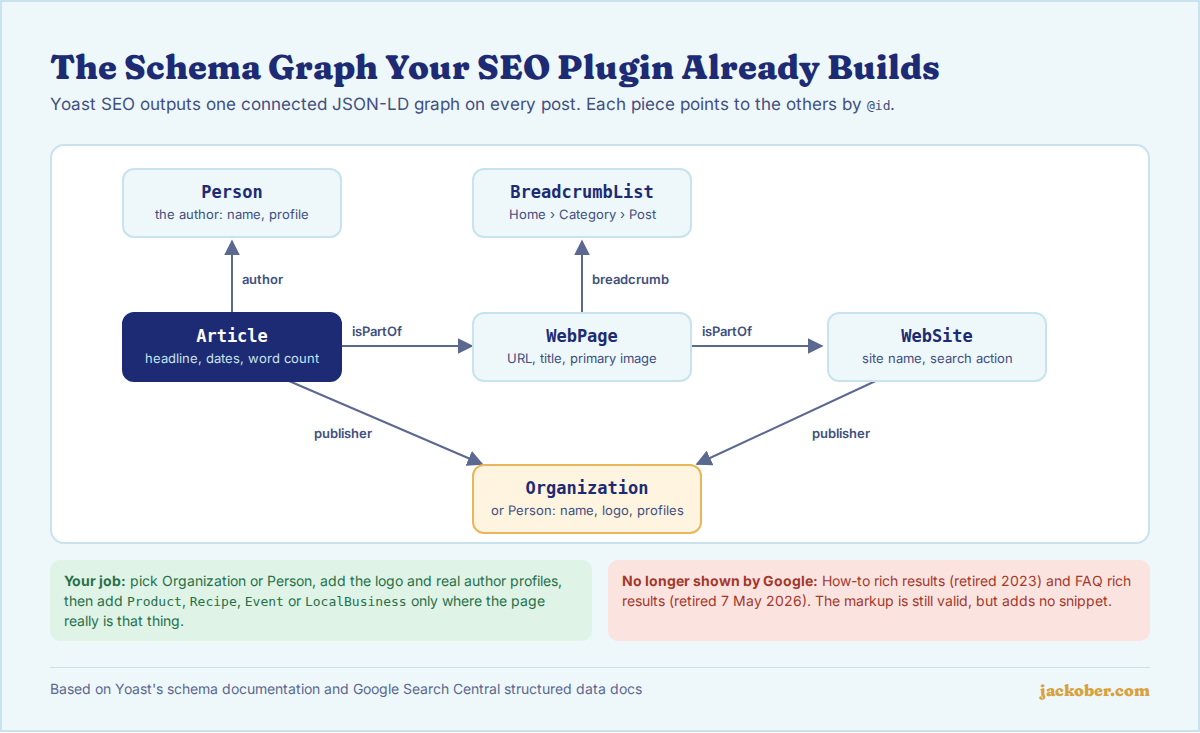
Schema markup (structured data) is usually added as a JSON-LD script in the page. Google recommends JSON-LD and uses it to understand content and, for supported types, to show rich results. Plugins such as Yoast SEO already output a connected graph of WebSite, WebPage, Article, BreadcrumbList and an Organization or Person on every post, as Yoast documents.
For most blogs the job is to configure that graph correctly, not to stack more plugins on top. Add extra types such as Product, Recipe, Event or LocalBusiness only when the page really is that thing. FAQ and How-to markup no longer produce rich results in Google: How-to went in 2023 and FAQ on 7 May 2026. Test every change with the Rich Results Test and the Schema Markup Validator.
What Schema Markup Does (and Does Not Do)
Structured data helps search engines interpret a page and makes it eligible for certain search features. It is not a ranking shortcut, and Google says plainly that valid markup does not guarantee a rich result. Its general structured data guidelines also require that markup describes content visitors can actually see on the page.
| Schema can | Schema cannot |
|---|---|
| Tell Google who wrote and published a page | Make a thin or unhelpful page rank |
| Make a page eligible for rich results such as product, recipe or event snippets | Guarantee that a rich result is shown |
| Connect your site, logo and social profiles to one entity | Describe content that is not visible on the page |
| Show breadcrumb paths in place of a raw URL | Bring back retired features such as FAQ or How-to rich results |
Which Schema Types Still Matter for WordPress in 2026
Google lists every feature it supports in its search gallery. That list has been shrinking: in June 2025 Google phased out several rarely used types (such as Claim Review, Estimated Salary, Learning Video, Special Announcement and Vehicle Listing), and in November 2025 it announced the same for practice problems and dataset results in Search.
| Schema type | Use it on | Status in Google Search |
|---|---|---|
Article / BlogPosting | Blog posts and news | Supported; your SEO plugin adds it |
BreadcrumbList | Every page with breadcrumbs | Supported |
Organization or Person | Site-wide (publisher) | Supported; used for logo and knowledge panel details |
Product with offers and reviews | WooCommerce product pages | Supported |
Recipe, Event, JobPosting, VideoObject | Pages that really are that content type | Supported |
LocalBusiness | A business with a physical location | Supported |
FAQPage | Pages with a visible FAQ | Rich result retired 7 May 2026; markup is still valid schema.org |
HowTo | Step-by-step guides | Rich result retired in 2023 |
How to Add Schema Markup in WordPress
Step 1: See what your site already outputs
Paste one of your post URLs into the Rich Results Test and the Schema Markup Validator. The first tells you which Google features the page is eligible for; the second shows every schema.org item in the page, including types Google does not use. Most WordPress sites with an SEO plugin will already show Article, WebPage, BreadcrumbList and Organization or Person.
Step 2: Configure the site-wide basics in your SEO plugin
In Yoast SEO, open the site representation settings and choose whether the site represents an Organization or a Person, then add the name, logo and social profiles. Yoast builds its output as a single graph in which each piece references the others by @id, so getting this one setting right improves every page. Set the default content types too, for example Article for posts and WebPage for pages.
Step 3: Make the author information real
Article markup names an author, so make sure each author has a real display name and a filled-in profile. A proper author archive helps here; see our guide to customizing the WordPress author page. Avoid publishing under a generic “admin” account.
Step 4: Add content-specific types only where they fit
For products, WooCommerce and most SEO plugins add Product markup automatically (our roundup of e-commerce plugins for WordPress covers the store side). For recipes, events or job listings, use a plugin built for that content type so the markup matches the visible fields. If you need a type your plugin does not support, you can add your own JSON-LD, for example in a small custom plugin:
add_action( 'wp_head', function () {
    if ( ! is_page( 'contact' ) ) {
        return;
    }
    $data = array(
        '@context' => 'https://schema.org',
        '@type'    => 'LocalBusiness',
        'name'     => 'Example Studio',
        'url'      => home_url( '/' ),
        'telephone' => '+1-555-0100',
        'address'  => array(
            '@type'           => 'PostalAddress',
            'streetAddress'   => '1 Example Street',
            'addressLocality' => 'Springfield',
            'postalCode'      => '12345',
            'addressCountry'  => 'US',
        ),
    );
    echo '<script type="application/ld+json">' . wp_json_encode( $data ) . '</script>' . "\n";
} );
Replace the example values with your own, and only output the data that also appears on the page. Using wp_json_encode() keeps the output valid JSON.
Step 5: Decide what to do with FAQ and How-to blocks
The Yoast FAQ and How-to blocks still output valid schema.org markup, and a visible FAQ section is still useful to readers. What changed is that Google no longer shows FAQ or How-to rich results, as recorded in its 2023 announcement and its documentation updates log. There is no need to rip out existing markup, but do not add these blocks expecting a richer search snippet.
Step 6: Test, then monitor
Re-run both testing tools after every change, then watch the rich result reports in Google Search Console over the following weeks. Errors there usually point to a missing required property or markup that no longer matches the page.
Quick Decision Table
| If your page is… | Then use |
|---|---|
| A normal blog post | The plugin default (Article); just configure publisher and author |
| A WooCommerce product | Product from WooCommerce or your SEO plugin, with price and availability |
| A recipe, event or job listing | A dedicated plugin or custom JSON-LD with that type |
| Your contact page for a local business | LocalBusiness with the same address shown on the page |
| A page with a visible FAQ | Optional FAQPage markup, without expecting a rich result |
| A category or tag archive | Usually nothing extra; the plugin adds CollectionPage and breadcrumbs |
Common Mistakes
- Running two SEO or schema plugins at once, which often outputs duplicate or conflicting
ArticleandOrganizationitems. - Marking up content visitors cannot see, such as reviews or ratings that are not on the page. This is against Google’s guidelines.
- Adding
RevieworAggregateRatingto your own business or blog posts to get stars in search results. - Leaving the Organization logo, name or author profiles empty, so every page carries incomplete publisher data.
- Testing only the homepage. Templates differ, so test a post, a page, a product and an archive.
- Assuming a valid test means a rich result will appear. Google says eligibility is not a guarantee, and some types are no longer shown at all. Duplicate or messy titles also hurt how pages appear; see how to fix duplicate title tags.
Frequently Asked Questions
Do I need a separate schema plugin if I use Yoast or Rank Math?
Usually not. Both output a full schema graph for posts, pages and archives. Add a separate tool only for a content type your SEO plugin does not cover, and check that the two do not output overlapping items.
Does schema markup improve rankings?
Not directly. Structured data helps Google understand a page and can make it eligible for rich results, which may improve how the listing looks. The page still has to earn its ranking with helpful content.
Should I remove FAQ schema now that FAQ rich results are gone?
There is no urgent reason to. The markup is still valid schema.org and does no harm when it matches a visible FAQ. Just stop adding it purely for the search snippet.
JSON-LD, Microdata or RDFa: which should I use?
Google accepts all three, but recommends JSON-LD because it is easiest to add and maintain. WordPress SEO plugins use JSON-LD, so stick with it for any custom markup.
Where can I see schema errors for my whole site?
In Google Search Console, under the rich result and enhancement reports. Each supported type found on your site gets its own report listing valid items and errors.
The Bottom Line
For a WordPress blog, good schema is mostly configuration: pick Organization or Person, fill in the logo and author profiles, and let your SEO plugin output the graph. Add specific types only where the page truly matches them, forget about FAQ and How-to snippets, and test every change. For the rest of your on-page setup, see our complete WordPress SEO guide and our explainer on how Google crawls and indexes WordPress.
Sources & Further Reading
- Google Search Central: Intro to how structured data markup works
- Google Search Central: General structured data guidelines
- Google Search Central: Structured data markup that Google Search supports
- Google Search Central: Latest documentation updates (FAQ rich result deprecation, May 2026)
- Google Search Central Blog: Changes to HowTo and FAQ rich results (2023)
- Google Search Central Blog: Simplifying the search results page (2025)
- Google Search Central Blog: An update on our efforts to simplify the search results page (2025)
- Yoast: Implementing schema with Yoast SEO
- Yoast: Why schema needs to be a graph
- Yoast: Structured data blocks
- Schema.org: Schema Markup Validator
Jackober uses AI tools for research, drafting, and editing. Articles are editorially reviewed and factual claims are checked against cited sources. Last reviewed: October 2026.