
AI companies now crawl the web for two different purposes: to collect training data for their models, and to fetch pages live when a user asks a question. Many WordPress site owners want to block the first but stay visible in AI search answers. That is possible, but only if you know which crawler does what.
This guide lists the main AI crawlers in 2026, shows how to block them in WordPress, and is honest about what robots.txt can and cannot do.
The Short Answer
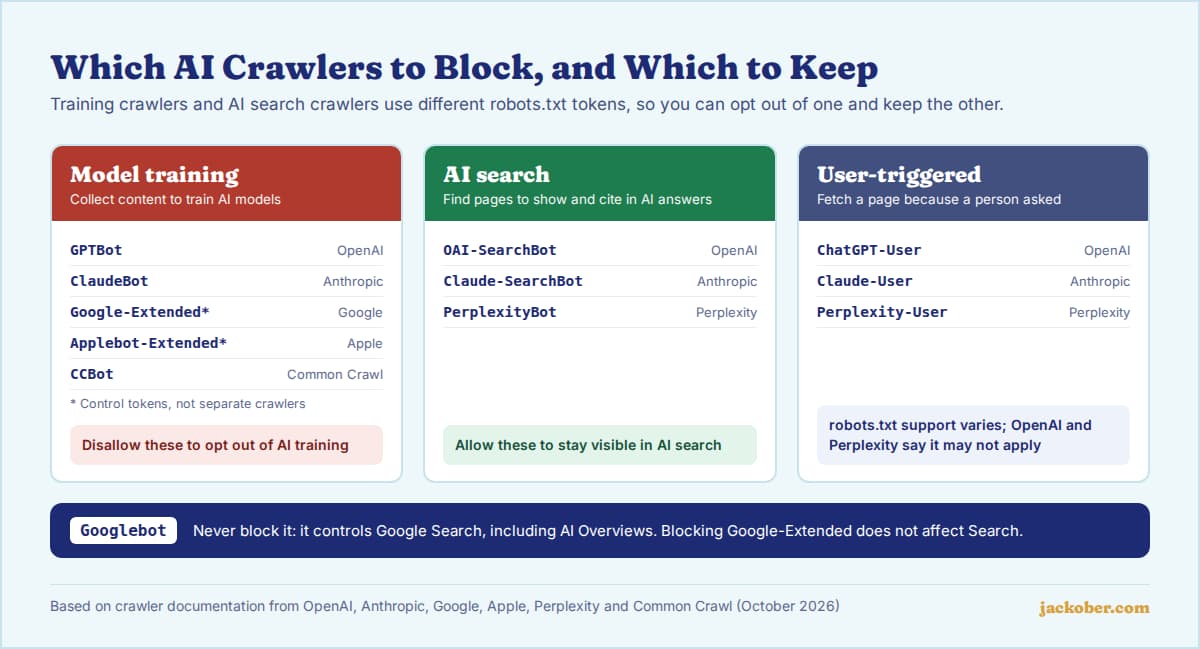
To stop major AI companies from using your content for model training, add Disallow: / rules in robots.txt for their training crawlers or tokens: GPTBot (OpenAI), ClaudeBot (Anthropic), Google-Extended (Google Gemini), Applebot-Extended (Apple) and CCBot (Common Crawl). Leave their search crawlers, such as OAI-SearchBot and Claude-SearchBot, allowed if you want to appear in AI search results.
In WordPress, edit robots.txt through Yoast SEO (Tools > File editor) or a physical file in your site root. Remember that robots.txt is a request, not a lock: reputable crawlers honour it, user-triggered fetches may not, and scrapers ignore it. For enforcement, use a firewall rule, such as Cloudflare’s AI crawler blocking.
The Main AI Crawlers and What They Do
| Robots.txt token | Company | Purpose | Block if you want to… |
|---|---|---|---|
| GPTBot | OpenAI | Training data | Opt out of OpenAI model training |
| OAI-SearchBot | OpenAI | ChatGPT search results | Leave out of ChatGPT search (not recommended for visibility) |
| ChatGPT-User | OpenAI | Fetches a page when a user asks | Robots.txt may not apply |
| ClaudeBot | Anthropic | Training data | Opt out of Anthropic model training |
| Claude-SearchBot | Anthropic | Search result quality | Leave out of Claude search |
| Claude-User | Anthropic | Fetches a page when a user asks | Stop user-directed fetches |
| Google-Extended | Gemini training and grounding (not Search) | Opt out of Gemini use without affecting Google Search | |
| Applebot-Extended | Apple | Apple foundation model training | Opt out of Apple model training |
| PerplexityBot | Perplexity | Perplexity search results | Leave out of Perplexity search |
| CCBot | Common Crawl | Open web archive widely used for AI training | Stay out of Common Crawl datasets |
Two details matter. First, Google-Extended and Applebot-Extended are control tokens, not separate crawlers: Google says Google-Extended does not affect Google Search, including AI Overviews, which follow your Googlebot rules. Second, OpenAI and Perplexity state that their user-triggered agents (ChatGPT-User and Perplexity-User) may not follow robots.txt, because a person requested the page.
| If your priority is… | Then… |
|---|---|
| Keeping your content out of model training | Block the training tokens (GPTBot, ClaudeBot, Google-Extended, Applebot-Extended, CCBot) |
| Getting cited in AI search tools | Allow OAI-SearchBot, Claude-SearchBot and PerplexityBot |
| Google Search and AI Overviews traffic | Never block Googlebot; blocking Google-Extended is safe for Search |
| Reducing server load from aggressive bots | Use rate limiting or a firewall, not only robots.txt |
| Protecting paid or members-only content | Put it behind login; robots.txt does not protect private content |
There is no universally right answer. Yoast’s own discussion of blocking AI bots lays out the trade-off between protecting content and being visible where people now search.
How to Block AI Crawlers in WordPress
1. Check your current robots.txt
Open https://yourdomain.com/robots.txt. WordPress serves a virtual file by default; if a physical robots.txt exists in the site root, it takes priority. Note what is already there so you do not overwrite existing rules.
2. Add the rules
This example blocks training crawlers while leaving search crawlers and Googlebot untouched:
# Opt out of AI model training
User-agent: GPTBot
Disallow: /

User-agent: ClaudeBot
Disallow: /

User-agent: Google-Extended
Disallow: /

User-agent: Applebot-Extended
Disallow: /

User-agent: CCBot
Disallow: /
Each group needs its own User-agent line. Google’s robots.txt specification explains how crawlers pick the most specific matching group, so a named group overrides your general User-agent: * rules for that crawler.
3. Choose where to edit
- Yoast SEO: go to Yoast SEO > Tools > File editor and paste the rules. Yoast SEO Premium also has toggles under Settings > Advanced > Crawl optimization to block unwanted bots such as GPTBot, CCBot and Google-Extended.
- A physical file: upload
robots.txtto the site root by SFTP or your hosting file manager.
4. Enforce it at the edge (optional)
If you need actual blocking, not a request, use your CDN or firewall. Cloudflare offers one-click AI bot blocking, including on its free plan, and AI Crawl Control to allow or block individual crawlers. Our guide to setting up a CDN for WordPress covers getting a site behind one.
5. Verify
Reload your robots.txt URL to confirm the rules are live, and clear any page cache if the old version still appears. OpenAI notes it can take about 24 hours for its systems to pick up changes. Check your server logs later for the user agents you blocked.
What About llms.txt?
llms.txt is a proposed Markdown file, published by Answer.AI in September 2024, that offers language models a curated map of a site. It is not a blocking mechanism and not a ratified standard. Google states in its guidance on AI features and your website that you do not need special AI files to appear in Google Search, including its AI features. Adding one is harmless, but do not expect it to change rankings or block anything.
Common Mistakes
- Blocking Googlebot to stop AI Overviews. It removes you from Google Search entirely. Google-Extended does not control AI Overviews either; snippet controls such as
nosnippetare the documented options. - Blocking every bot with a “User-agent: *” disallow. This also blocks search engines and can deindex the site.
- Assuming robots.txt removes content already collected. It only applies to future crawling.
- Blocking search crawlers by accident. Disallowing OAI-SearchBot or PerplexityBot removes you from those search tools, not just from training.
- Forgetting the cache. Caching plugins and CDNs can serve an old robots.txt for a while.
For how search crawlers treat WordPress sites more broadly, see our guide to WordPress indexing and crawl behavior and the complete WordPress SEO guide.
FAQ
Does blocking GPTBot remove my site from ChatGPT?
No. GPTBot is OpenAI’s training crawler. ChatGPT search uses OAI-SearchBot, and OpenAI treats the two settings independently, so you can block one and allow the other.
Will blocking Google-Extended hurt my Google rankings?
According to Google’s documentation, no. Google-Extended only controls use in Gemini models and Gemini Apps grounding; Google Search, including AI Overviews, is governed by Googlebot.
Do all AI companies respect robots.txt?
The companies listed above document robots.txt support for their crawlers, with exceptions for user-triggered fetches. Unknown scrapers may ignore it entirely, which is why firewall rules exist.
Can I slow AI crawlers down instead of blocking them?
Some support it. Anthropic, for example, honours the non-standard Crawl-delay directive for ClaudeBot. Google does not support Crawl-delay, so rate limiting at the server or CDN is more dependable.
Is blocking AI crawlers a security measure?
No. Robots.txt is public and voluntary. Protect private areas with authentication and follow standard WordPress security practices.
The Bottom Line
Separate training crawlers from search crawlers. Block GPTBot, ClaudeBot, Google-Extended, Applebot-Extended and CCBot if you want to opt out of AI training; keep Googlebot and AI search crawlers allowed if you want the traffic. Edit robots.txt through Yoast or a root file, and add a firewall rule when you need enforcement rather than a polite request.
Sources & Further Reading
- OpenAI: Overview of OpenAI Crawlers
- Anthropic: Does Anthropic crawl data from the web?
- Google: Common crawlers (Google-Extended)
- Google: How Google interprets the robots.txt specification
- Google Search Central: AI features and your website
- Apple: About Applebot
- Perplexity: Perplexity Crawlers
- Common Crawl: CCBot
- Yoast: Block unwanted bots with Yoast SEO
- Cloudflare: Block AI Bots
- llmstxt.org: The /llms.txt proposal
Jackober uses AI tools for research, drafting, and editing. Articles are editorially reviewed and factual claims are checked against cited sources. Last reviewed: October 2026.