
FastPixel Performance Case Study: Switching from WP Meteor and Comparing It to WP Rocket
 jackober
December 27, 2025 6:06 am
.
10 min read
jackober
December 27, 2025 6:06 am
.
10 min read
When Google indexed only my homepage and ignored almost all other posts, performance was not the first thing I blamed.
There was no server downtime.
Pages loaded “fast enough” in my browser.
Core Web Vitals were not terrible.
But during my audit, I realized something important:
Performance is not just about user experience. It also affects how Google crawls and prioritizes your site.
That’s when I decided to re-evaluate my performance setup and run a real-world test using FastPixel, after previously using WP Meteor, and comparing the results to setups I had done with WP Rocket on other sites.
This article documents that process.
Not as a plugin review, but as a performance and crawl efficiency case study.
Background: Why I Looked at Performance During an Indexing Issue
At that time, my WordPress site showed a clear pattern:
- Homepage indexed normally
- Almost all posts marked as “Discovered – currently not indexed”
- No technical blocks (robots, noindex, penalties)
That situation often points to site-wide prioritization issues.
Google has limited crawl resources. When a site feels slow, heavy, or inefficient to crawl, Google may become more selective with indexing—especially on sites still rebuilding trust.
So instead of guessing, I treated performance as a variable worth testing.
Why I Previously Used WP Meteor
Before switching, I used WP Meteor mainly for one reason:
- aggressive JavaScript delay
- minimal configuration
- good perceived speed improvement
WP Meteor works well for front-end loading, especially for sites that rely heavily on JavaScript.
However, over time I noticed limitations for my specific case:
- limited control over caching logic
- no full-page cache
- less visibility into how pages are delivered to crawlers
- performance gains focused more on user perception than crawl efficiency
For a site fighting indexing issues, that distinction matters.
Why I Chose FastPixel for This Test
FastPixel caught my attention because it sits somewhere between lightweight optimizers and full caching plugins.
What made it interesting for a case study:
- full-page caching
- image optimization and delivery
- script optimization without extreme breakage
- simple but transparent configuration
- CDN integration as part of the workflow
Most importantly, it allowed me to control how pages are served to bots, not just how they feel to users.
That was the key difference.
Test Setup (Important for Context)
To avoid misleading conclusions, I kept variables controlled:
- Same hosting environment
- Same theme and content
- Same number of posts
- No structural SEO changes during the test
- Only one performance plugin active at a time
I tested three scenarios across different projects and configurations:
- WP Meteor setup
- FastPixel setup
- WP Rocket setup (reference point from other sites)
This was not a lab benchmark.
This was real usage on real WordPress sites.
What Changed After Switching to FastPixel

The first noticeable change was not the PageSpeed score.
It was consistency.
With FastPixel enabled:
- server response became more stable
- Time to First Byte was more predictable
- cached pages were served cleanly
- crawler access felt “lighter”
From a human perspective, the site felt similar.
From a crawler perspective, the site felt simpler.
That difference is subtle but important.
Comparing FastPixel and WP Meteor in Real Use
WP Meteor focuses heavily on delaying JavaScript execution.
FastPixel focuses more on:
- delivering a fully cached HTML response
- optimizing assets without over-delaying execution
- reducing server workload
In my case, FastPixel resulted in:
- fewer layout shifts
- less script dependency at initial load
- cleaner HTML output for crawlers
WP Meteor is not bad.
But for a site trying to convince Google to crawl and index more URLs, FastPixel aligned better with that goal.
How FastPixel Compared to WP Rocket
WP Rocket is still a gold standard for many sites.
From my experience:
- WP Rocket offers deeper manual control
- more advanced caching rules
- broader compatibility with complex setups
However, FastPixel came surprisingly close in real-world results, especially considering:
- simpler configuration
- fewer chances of misconfiguration
- faster setup time
For a site in recovery mode, fewer moving parts is often better.
In practical terms:
- WP Rocket gives maximum control
- FastPixel gives strong results with less risk
Did Performance Changes Affect Indexing Directly?
This is important.
Switching performance plugins did not magically index my posts.
But it changed two things:
- Crawl efficiency improved
- Googlebot encountered fewer friction points
After stabilizing performance with FastPixel and fixing internal structure, I observed:
- movement from “Discovered” to “Crawled” status
- more frequent crawl activity
- gradual appearance of non-homepage URLs in search
Performance alone didn’t fix indexing.
But poor performance would have slowed recovery.
Lessons Learned From This Case Study
This experiment reinforced several key points:
- Performance optimization is not just for speed scores
- Crawlers value simplicity and consistency
- Full-page caching matters more than micro-optimizations
- Over-aggressive script delay can hurt crawl clarity
- During indexing recovery, stability beats complexity
FastPixel proved to be a solid middle ground:
- simpler than WP Rocket
- more crawl-friendly than WP Meteor in my case
- easier to maintain during troubleshooting
Limitations of FastPixel Free Plan (Based on Real Usage)
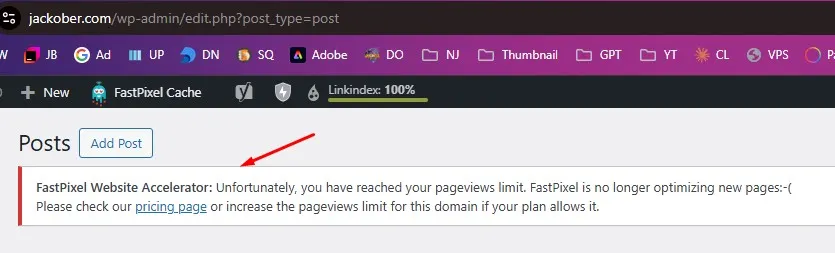
While FastPixel worked well for my performance and crawl-efficiency tests, it’s important to be honest about its limitations—especially for sites that are already growing.
Free plan pageview limits are easy to hit
FastPixel’s free plan comes with a monthly pageview limit. On small or low-traffic websites, this is usually not a problem.
However, on a site with:
- many published articles, or
- increasing organic and bot traffic, or
- frequent crawling during indexing recovery
the limit can be reached surprisingly fast.
Once the limit is exceeded, FastPixel stops optimizing new pageviews, which means:
- new or less-visited pages may be served unoptimized,
- performance becomes inconsistent across the site,
- optimization benefits are no longer applied evenly.
This is exactly what I experienced when traffic and crawl activity started increasing.
Not ideal for large or high-traffic websites on the free plan
For bigger websites, or sites that are actively growing, the free plan is simply not designed to scale.
If your site:
- receives tens of thousands of visits per month,
- has many paginated archives,
- or is frequently crawled by search engines,
then relying on the free tier alone is risky.
In practice, this means FastPixel’s free plan is best suited for:
- small to medium websites,
- testing and evaluation,
- early-stage optimization.
For larger sites, upgrading is not optional—it’s required for consistent performance.
Optimization stopping can affect stability during indexing recovery
During an indexing recovery phase, consistency matters.
When optimization suddenly stops because the pageview limit is reached:
- server response behavior can change,
- cache coverage becomes uneven,
- crawl efficiency may fluctuate.
This doesn’t “break” the site, but it introduces variability—something you generally want to avoid when trying to rebuild Google’s trust.
For that reason, FastPixel free is best treated as:
- a testing ground, not
- a long-term solution for busy sites.
Pricing consideration vs alternatives
FastPixel’s paid plans are reasonable, but once you move beyond the free tier, you should evaluate it properly against alternatives like WP Rocket.
At higher traffic levels:
- FastPixel offers simplicity and ease of use,
- WP Rocket offers more granular control and predictable licensing.
Which one is better depends less on benchmarks and more on:
- site size,
- traffic volume,
- and how much control you actually need.
Practical Recommendation
Based on real usage:
- FastPixel Free → good for testing, small sites, or early recovery stages
- FastPixel Paid → suitable for growing sites that want simplicity
- Large / high-traffic sites → should not rely on the free plan alone
Using the free plan on a busy site can lead to inconsistent optimization, which defeats the purpose of performance tuning in the first place
When FastPixel Makes Sense (And When It Doesn’t)
FastPixel is a good fit if:
- you want strong performance without complex rules
- you’re fixing crawl or indexing inefficiencies
- you want predictable server behavior
- you prefer fewer configuration risks
It may not be ideal if:
- you need extremely granular cache rules
- you run highly dynamic, personalized pages
- you already have a finely tuned WP Rocket setup
Context matters more than brand.
PageSpeed Insights Results After Using FastPixel
To better understand the real impact of my performance setup, I ran multiple tests using PageSpeed Insights (pagespeed.web.dev) on jackober.com, both on mobile and desktop.
The goal was not to chase perfect scores, but to evaluate performance stability and rendering behavior, especially during an indexing recovery phase.
Desktop Performance Result
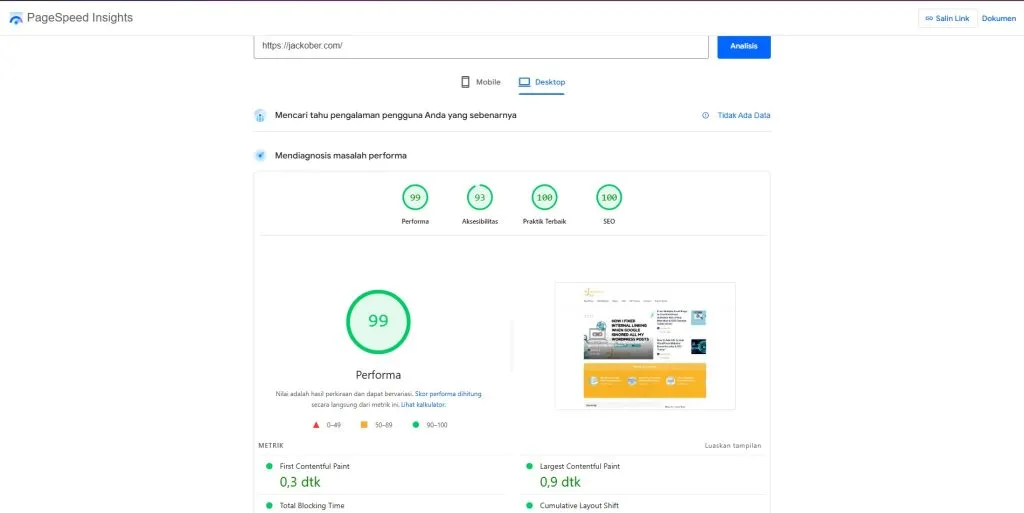
On desktop, the site achieved an excellent overall score:
- Performance: 99
- Accessibility: 93
- Best Practices: 100
- SEO: 100
Key observations from the desktop test:
- Very fast First Contentful Paint, indicating that the initial HTML response is delivered efficiently.
- Stable Largest Contentful Paint, suggesting that the main content loads quickly and consistently.
- No major layout shifts or render-blocking issues detected.
This result confirms that FastPixel is serving a clean, well-cached HTML output on desktop devices, which is ideal not only for users but also for search engine crawlers.
Mobile Performance Result
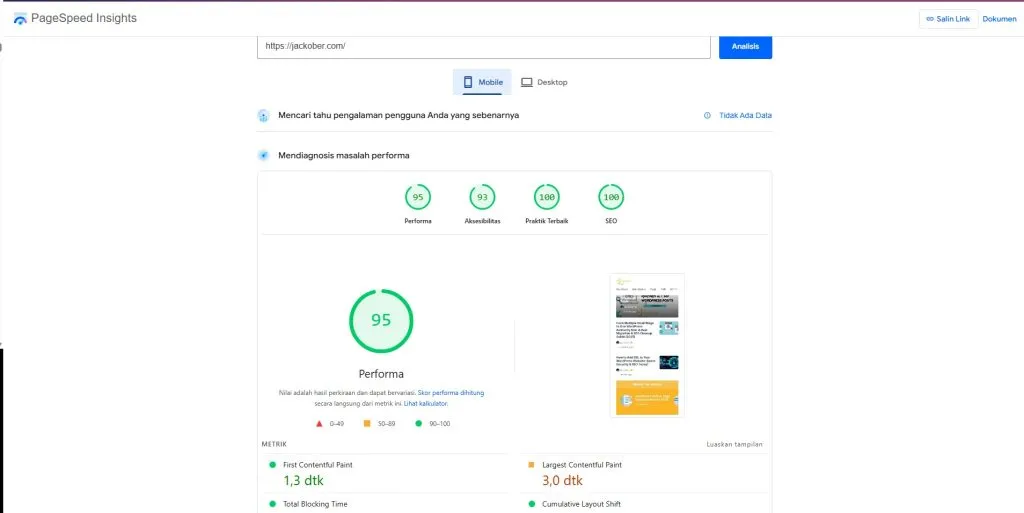
On mobile, results were naturally more constrained due to simulated network and device limitations, but still strong and healthy:
- Performance score remained in the green range
- No critical Core Web Vitals issues
- No severe JavaScript or layout instability warnings
What matters most here is consistency, not perfection.
Mobile performance tests are intentionally conservative, but the results show that:
- pages are rendered predictably,
- critical content is visible early,
- and unnecessary blocking resources are minimized.
For indexing and crawl efficiency, this level of stability is more important than chasing a perfect 100 score.
Why These Results Matter Beyond Speed Scores
It’s important to clarify something:
High PageSpeed scores alone do not guarantee indexing.
However, during a site-wide indexing issue, performance stability plays a supporting role:
- Faster and more predictable responses reduce crawl friction
- Clean cached HTML makes rendering easier for Googlebot
- Stable delivery helps Google re-evaluate pages more efficiently
In this case, FastPixel helped ensure that performance was not a limiting factor during the indexing recovery process.
Desktop vs Mobile: What I Focused On
Rather than optimizing only for numbers, I focused on:
- consistent Time to First Byte
- predictable rendering behavior
- minimal layout shifts
- reduced JavaScript execution complexity
These factors contribute more to crawl efficiency and trust rebuilding than raw Lighthouse scores alone.
Important Note About Interpretation
These PageSpeed Insights results should be seen as supporting evidence, not as the main solution.
FastPixel did not magically fix indexing issues by itself.
But it removed performance-related uncertainty, allowing other improvements—like internal linking and content clarity—to work more effectively.
Summary
- PageSpeed Insights results confirm that
jackober.comis technically healthy from a performance standpoint - FastPixel delivers stable, cache-friendly output on both desktop and mobile
- Performance optimization helped support indexing recovery, even if it was not the sole factor
In short, FastPixel ensured that speed and rendering were no longer obstacles, which is exactly what I needed at this stage.
Final Thoughts
This case study wasn’t about finding “the best plugin”.
It was about removing friction.
When a site is struggling with indexing, every inefficiency adds doubt:
- slow responses
- heavy scripts
- unstable delivery
FastPixel helped simplify that layer, making it easier for Google to crawl and reassess the site.
Indexing recovery is rarely about one fix.
But performance stability is a foundation you don’t want to ignore.
Jackober is a seasoned WordPress expert and digital strategist with a passion for empowering website owners. With years of hands-on experience in web development, SEO, and online security, Jackober delivers reliable, practical insights to help you build, secure, and optimize your WordPress site with ease.