
At one point, my WordPress site reached a frustrating state.
When I searched Google using:
site:mydomain.com
Only one result appeared — the homepage.
No blog posts.
No tutorials.
No case studies.
Google Search Console showed hundreds of known URLs, but almost all of them were either “Discovered – currently not indexed” or completely missing from search results.
There was no manual penalty.
No security issue.
No obvious technical error.
So instead of guessing or panicking, I decided to audit my own site like an external SEO consultant would.
This article documents exactly how I audited my WordPress site, what I looked for first, what I intentionally ignored, and what conclusions actually helped me move forward.
This is not a theory-based SEO article.
It’s a real audit process for a real problem.
Step 1: I Confirmed This Was Not a Penalty or Technical Block
Before touching content or structure, I needed certainty.
I checked Google Search Console for two critical things:
- Manual actions
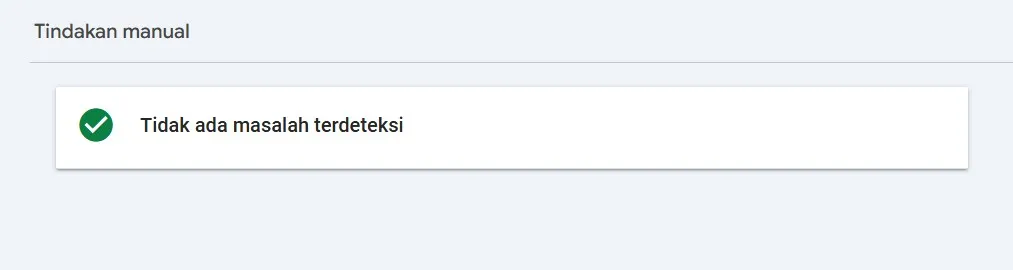
- Security issues
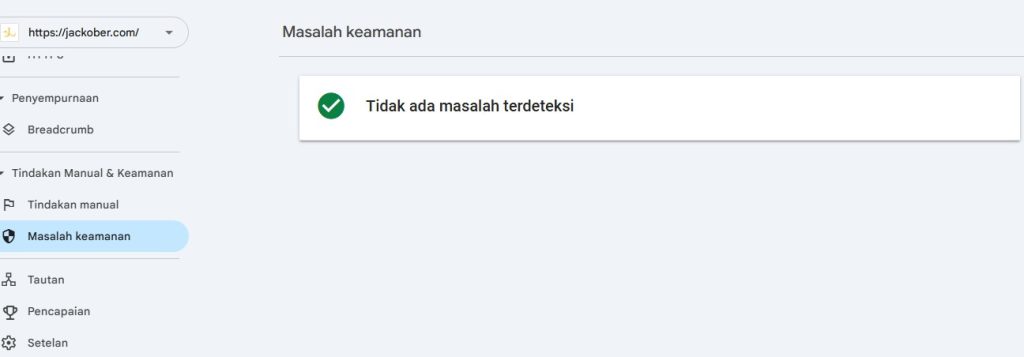
Both showed “No issues detected.”
That immediately changed the mindset.
If Google was not punishing the site, then this was not about recovery from a ban.
It was about earning selection, not removing a penalty.
Next, I verified that I wasn’t blocking Google myself:
- WordPress “Discourage search engines” setting was unchecked
- SEO plugin had posts and pages set to “index”
- robots.txt did not block
/ - XML sitemap was accessible and submitted
Everything checked out.
At this point, I stopped wasting time on technical myths.
Google could crawl the site.
Google simply did not want to index most pages.
Step 2: I Looked at the Pattern, Not Individual URLs
A mistake many site owners make is inspecting URLs one by one.
I did the opposite.
I opened the Pages / Indexing report in Search Console and looked for patterns:
- Almost all blog posts were excluded
- The dominant reasons were:
- “Discovered – currently not indexed”
- “Crawled – currently not indexed”
- The homepage was consistently indexed and refreshed
This pattern matters.
If random URLs fail → usually technical.
If almost everything fails except homepage → site-wide trust and prioritization issue.
This meant:
- fixing one article would not solve it
- publishing more of the same content would not help
- something about the site as a whole was making Google cautious
Step 3: I Audited My Content Like Google Would
This was the most uncomfortable part.
I exported a list of all posts and started reviewing them without emotional attachment.
For each article, I asked three brutal questions:
- Would this still be useful if Google didn’t exist?
- Does this article say something meaningfully different from similar posts online?
- Does it show real experience, or just safe explanations?
Many articles were not “bad”.
But they were:
- safe
- generic
- easy to replace
From Google’s perspective, those pages were not urgent to store.
That realization alone explained a lot.
Step 4: I Identified Overlapping Intent Instead of Duplicate Text
The problem was not plagiarism or copied content.
The problem was overlapping intent.
Multiple articles targeted:
- similar keywords
- similar search intent
- similar reader problems
Even if the wording was different, the value proposition was not.
Google does not need five variations of the same solution from one domain — especially from a site that is still rebuilding trust.
So instead of asking:
“Is this content unique?”
I started asking:
“Does this content deserve to exist as a separate URL?”
That mindset shift changed how I viewed my site.
Step 5: I Checked Internal Importance Signals
Next, I audited internal linking and structure.
I noticed several problems:
- Many posts were only linked from category pages
- Important articles were not linked from the homepage
- Internal links were inconsistent and often generic
From Google’s point of view, the site was saying:
“These pages exist, but none of them are especially important.”
So I wrote down which pages should matter most.
Those pages would later become:
- internal link hubs
- homepage-linked content
- trust anchors for the site
Step 6: I Audited Index Noise, Not Just Content
Another overlooked issue was index noise.
The site had many URLs that did not deserve Google’s attention:
- thin tag archives
- date archives
- attachment pages
- internal search result pages
Even if those pages were harmless, they diluted crawl focus.
I made the decision to reduce noise first, not expand content.
I noindexed or disabled:
- tag archives with little value
- date-based archives
- attachment URLs
This was not about “SEO tricks”.
It was about clarity.
I wanted Google to clearly see:
“These are the pages that matter.”
Step 7: I Published One Article With a Different Purpose
Instead of trying to fix everything at once, I changed strategy.
I published one article with a very specific goal:
- Not to rank
- Not to get traffic
- But to demonstrate experience
The article focused on:
- a real problem I faced
- what I tried
- what failed
- what finally made sense
No templates.
No keyword stuffing.
No plugin list.
That article became a reference point for the rest of the site.
Step 8: I Changed How I Used Internal Linking
After that, internal linking stopped being an afterthought.
For every important article:
- it received a clear link from the homepage or a main section
- it linked to other related articles naturally
- older articles were updated to point to it
This created a visible content cluster instead of isolated posts.
Google understands context through connections, not through volume.
Step 9: I Stopped Forcing Indexing Requests
Earlier, I had tried requesting indexing repeatedly.
It didn’t help.
After the audit, I changed behavior:
- I only requested indexing for new or heavily improved content
- I waited days instead of hours
- I let Google crawl naturally
Requesting indexing is a suggestion, not a command.
If Google doesn’t trust the site yet, requests are ignored.
Step 10: I Measured Progress Correctly
I stopped obsessing over:
- total indexed URLs
- daily fluctuations
Instead, I watched for:
- a second URL appearing in
site:search - movement from “discovered” to “crawled”
- gradual increase in impressions
When one additional page appeared, that was enough proof.
Trust was rebuilding.
Slowly, but clearly.
What This Audit Taught Me
Auditing my own WordPress site during a near-total deindex taught me several things:
- Indexing issues are often about selection, not punishment
- Google does not owe any site a full index
- Publishing more content does not equal better signals
- Experience-driven articles matter more during recovery
Most importantly, I learned that earning back Google’s trust is incremental.
You don’t fix this with 20 new posts.
You fix it by convincing Google one page at a time.
Final Thoughts
If your WordPress site is stuck with only the homepage indexed, don’t assume something is broken.
Often, nothing is broken.
Google is simply waiting for a reason to care more.
Audit your site honestly.
Reduce noise.
Improve clarity.
Publish fewer, stronger articles.
Once Google sees intent and consistency, indexing usually follows.
Not instantly.
But sustainably.