
As a WordPress developer at Jackober, I’ve helped numerous organizations transform their internal communications and workflows by building custom intranet solutions using WordPress. While WordPress is widely known as a blogging and website platform, its flexibility and extensive plugin ecosystem make it an excellent choice for creating robust, feature-rich intranet systems.
In this experts guide, I’ll walk you through everything you need to know about building an intranet with WordPress—from planning and setup to advanced customizations and security considerations. Whether you’re a small business looking to improve internal communications or a large enterprise seeking a cost-effective alternative to expensive intranet solutions, this guide will provide you with actionable insights and practical steps.
What is an Intranet and Why Build One with WordPress?
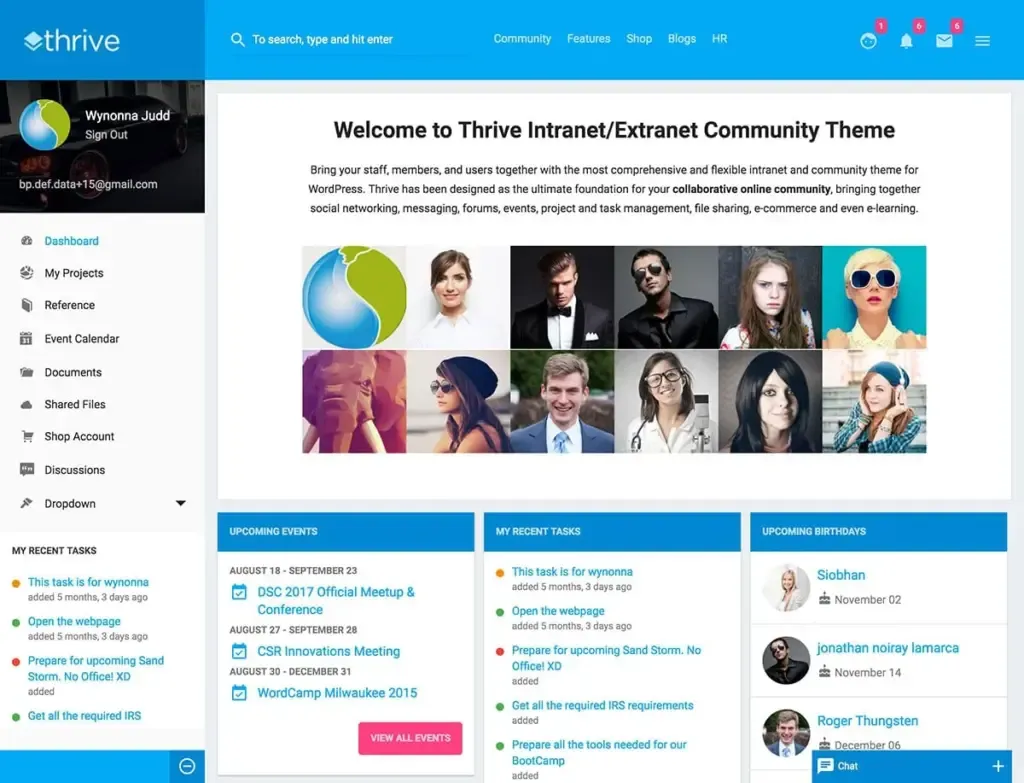
Before diving into the technical details, let’s establish what an intranet is and why WordPress is an excellent platform for building one.
Understanding Intranets
An intranet is a private network accessible only to an organization’s staff. Unlike the internet, which is public, an intranet serves as a centralized hub for internal communications, document sharing, collaboration, and workflow management.
Key intranet features typically include:
- Internal communications (news, announcements, newsletters)
- Document management and file sharing
- Employee directories and profiles
- Project management tools
- Knowledge bases and wikis
- Discussion forums
- HR resources (policies, forms, benefits information)
- Training materials
- Calendars and event management
- Task management systems
Why Choose WordPress for Your Intranet?
WordPress offers several compelling advantages for intranet development:
1. Familiarity and Ease of Use
Many employees are already familiar with WordPress, reducing the learning curve and training requirements. WordPress’s intuitive interface makes it easy for non-technical staff to create and manage content without developer assistance.
2. Cost-Effectiveness
WordPress is open-source and free to use. Compared to proprietary intranet solutions that can cost thousands or tens of thousands of dollars, WordPress offers significant cost savings while providing comparable functionality.
3. Extensibility
With over 59,000 plugins in the WordPress repository and countless premium options, WordPress can be extended to include virtually any functionality your intranet might need.
4. Customization
WordPress themes and templates can be customized to match your organization’s branding and specific requirements. Whether you’re using Free WordPress Themes or premium options, the platform offers extensive customization possibilities.
5. Scalability
WordPress can scale from supporting small teams to large enterprises with thousands of users. As your organization grows, your WordPress intranet can grow with it.
6. Mobile Responsiveness
Modern WordPress themes are mobile-responsive by default, ensuring your intranet is accessible on smartphones and tablets—crucial for remote and field workers.
7. Regular Updates and Security
WordPress receives regular updates that improve security, performance, and functionality. With proper configuration, WordPress can be a secure platform for your organization’s internal information.
Planning Your WordPress Intranet
Successful intranet implementation starts with thorough planning. Here’s how to approach the planning phase:
1. Identify Your Intranet Requirements
Begin by documenting your organization’s specific needs:
- User base: How many employees will use the intranet?
- Departments: Which departments need specialized sections or features?
- Content types: What kinds of content will be published (documents, news, policies, etc.)?
- Functionality: What specific tools and features are required (document management, forums, project management, etc.)?
- Workflows: Which business processes could be improved through intranet tools?
- Integration needs: Does the intranet need to connect with other systems (HR software, CRM, etc.)?
2. Define User Roles and Permissions
Determine who will have access to what content and functionality:
- Administrators: Full access to all intranet features and settings
- Department managers: Ability to manage their department’s content
- Content creators: Permission to create and edit specific types of content
- Regular employees: Basic access to view content and participate in discussions
- External partners: Limited access to specific sections (if applicable)
3. Create an Information Architecture
Develop a clear structure for your intranet:
- Main navigation categories
- Department subsections
- Content hierarchies
- Taxonomy strategy (categories, tags, custom taxonomies)
- Search and filtering requirements
4. Establish Design Requirements
Consider the visual and user experience aspects:
- Branding alignment: How will your intranet reflect your organization’s visual identity?
- User interface: What will the dashboard and main interfaces look like?
- Mobile experience: How will the intranet function on mobile devices?
- Accessibility: What accessibility standards need to be met?
5. Set a Realistic Timeline and Budget
Develop a project plan that includes:
- Development phases and milestones
- Resource allocation
- Budget for hosting, plugins, customization, and maintenance
- Training and rollout strategy
Technical Setup: Building Your WordPress Intranet
With your planning complete, it’s time to set up the technical foundation of your WordPress intranet.
1. Choose the Right Hosting Environment
Your intranet requires reliable, secure hosting with good performance. Consider these options:
Self-Hosted (On-Premises)
- Complete control over your data and security
- No reliance on external providers
- Higher initial setup and maintenance costs
- Requires IT staff for management
Cloud-Based WordPress Hosting
- Lower initial setup costs
- Professional management and security
- Regular backups and updates
- Examples include Flywheel WordPress Hosting or WP Engine
Virtual Private Server (VPS)
- Balance of control and managed services
- Better performance than shared hosting
- More affordable than dedicated servers
- Good option for medium-sized organizations
Regardless of your hosting choice, ensure it provides:
- Sufficient storage for your documents and media
- Adequate bandwidth for your user base
- Strong security features
- Regular backup solutions
- Good uptime guarantees
2. Install WordPress and Configure Basic Settings
- Install WordPress on your chosen hosting environment
- Configure essential settings:
- Site title and tagline (reflect your organization’s name)
- Time zone and date format
- Discussion settings (typically limiting comments to registered users)
- Permalink structure (consider using a simple structure like /%postname%/)
- Set up SSL for secure connections by following our guide on How to add SSL to WordPress
3. Choose and Configure a Theme
Select a theme that’s suitable for intranet purposes. Good intranet themes typically feature:
- Clean, professional design
- Responsive layouts for mobile access
- Good navigation options
- Customization flexibility
- Performance optimization
You have several options:
Dedicated Intranet Themes
- Themes specifically designed for intranets, like Monochrome Pro or Divi Intranet Layout
- Often include built-in features for document management, user profiles, etc.
Multipurpose Themes
- Flexible themes that can be customized for intranet use
- Examples include Astra, GeneratePress, or Divi
Custom Theme Development
- Tailored specifically to your organization’s needs
- Provides the most control over design and functionality
- Requires development expertise or hiring a WordPress Expert for Hire
For theme customization, you might consider using one of the Best WordPress Page Builders to create custom layouts without coding.
4. Essential Plugins for WordPress Intranets
Here are the core plugins you’ll likely need for your intranet:
User Management and Authentication
- Members: Advanced user role management
- User Role Editor: Customize user capabilities
- WP-Members: Membership and content restriction
- SAML Single Sign-On: Enterprise authentication integration
Document Management
- WordPress Download Manager: Organize and control access to files
- Document Library Pro: Create searchable document repositories
- WP File Manager: Backend file management
- Google Drive Embedder: Integrate with Google Workspace
Communication Tools
- BuddyPress: Social networking features for employees
- bbPress: Discussion forums
- Ultimate Member: Enhanced user profiles
- Yammer Integration: Connect to Microsoft’s enterprise social network
Content Organization
- Advanced Custom Fields: Create specialized content types
- Admin Columns: Customize admin views of content
- TablePress: Create and manage tables
- Content Aware Sidebars: Display relevant sidebar content
Search Enhancement
- SearchWP: Improved search functionality
- Relevanssi: Better search results and filtering
- Ajax Search Pro: Real-time search suggestions
Project and Task Management
- Project Management by UpStream: Comprehensive project tools
- WP Project Manager: Task assignment and tracking
- Kanban Boards for WordPress: Visual project management
- WP Trello: Trello-like boards for task management
Calendar and Events
- The Events Calendar: Schedule and display company events
- Booking Calendar: Room and resource booking
- Team Booking: Appointment scheduling
Forms and Workflows
- Gravity Forms: Advanced form creation
- Formidable Forms: Form builder with workflow capabilities
- WP Fluent Forms: User-friendly form builder
- WP Approval Workflow: Document approval processes
Analytics and Reporting
- WP Statistics: Track intranet usage
- Matomo Analytics: Privacy-focused analytics
- Stream: User activity logging
- WP Activity Log: Comprehensive audit logs
5. Security Configuration
Security is paramount for intranet implementations. Implement these essential security measures:
Access Control
- Limit login attempts with plugins like Limit Login Attempts Reloaded
- Implement two-factor authentication using Google Authenticator or Duo
- Configure IP restrictions to limit access to your organization’s networks
- Set up a VPN for secure remote access
Data Protection
- Ensure proper SSL implementation
- Configure file permissions correctly
- Implement regular automated backups
- Set up data encryption for sensitive information
Security Hardening
- Use security plugins like Wordfence, iThemes Security, or Sucuri
- Change the default WordPress login URL
- Disable XML-RPC if not needed
- Remove WordPress version information
- Implement strong password policies
Monitoring and Maintenance
- Set up security scanning and monitoring
- Establish a regular update schedule for WordPress core, themes, and plugins
- Create security incident response procedures
- Perform regular security audits
Advanced Intranet Features and Customizations
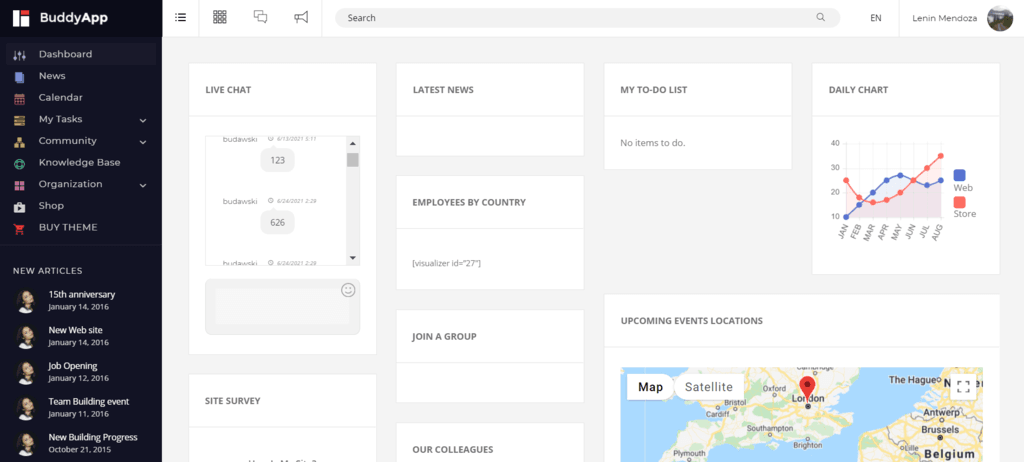
With the foundation in place, let’s explore advanced features to enhance your WordPress intranet.
1. Creating a Custom Dashboard
The dashboard is the first thing users see when logging in. Customize it to provide relevant information and quick access to important features:
Admin Dashboard Customization
- Use plugins like Admin Columns Pro to customize admin views
- Create custom dashboard widgets with relevant company information
- Remove unnecessary WordPress default widgets
- Add quick links to frequently used intranet sections
User Dashboard
- Develop a custom user dashboard with upcoming events, recent documents, and announcements
- Add task lists and notifications
- Include personalized content based on the user’s department or role
- Provide analytics on the user’s activity and contributions
2. Implementing Single Sign-On (SSO)
For larger organizations, implementing SSO streamlines the login process and enhances security:
Integration Options
- Microsoft Azure AD / Office 365 integration
- Google Workspace (formerly G Suite) authentication
- SAML-based SSO with providers like Okta or OneLogin
- LDAP integration with Active Directory
Implementation Plugins
- miniOrange SSO
- WP SAML Auth
- OAuth Single Sign On
3. Department-Specific Sections
Create tailored spaces for different departments:
HR Portal
- Employee handbook and policies
- Benefits information
- Leave request forms
- Onboarding materials
- Performance review documentation
IT Department
- Support ticket system using WordPress Support Ticket plugins
- Knowledge base for common IT issues
- Software request forms
- System status updates
Sales and Marketing
- Marketing asset library
- Brand guidelines
- Sales collateral and presentations
- Lead and customer information
- Campaign performance reports
Finance
- Expense report submission
- Budget documentation
- Financial policies
- Payment processing information using Payment Gateways for WordPress as reference
4. Advanced Document Management
Enhance your intranet’s document capabilities:
Version Control
- Track document revisions and changes
- Allow users to compare different versions
- Implement approval workflows for document updates
Document Collaboration
- Real-time collaborative editing
- Document check-in/check-out functionality
- Comment and feedback systems on documents
Intelligent Organization
- Implement metadata tagging for better document classification
- Create custom taxonomies for document categorization
- Build advanced search capabilities for document retrieval
Access Control
- Set granular permissions at the document level
- Create document access groups based on departments or projects
- Implement time-limited access for certain documents
5. Employee Directory and Profiles
Create a comprehensive employee directory:
Enhanced Profiles
- Professional information (position, department, skills)
- Contact details (email, phone, office location)
- Reporting structure and team affiliations
- Project involvement and responsibilities
Directory Features
- Advanced search and filtering options
- Organizational chart visualization
- Team groupings and department views
- Employee recognition and achievements
Social Features
- Activity feeds for employee updates
- Skill endorsements
- Work anniversary and birthday notifications
- Direct messaging between employees
6. Workflow Automation
Streamline business processes through automation:
Approval Workflows
- Document approval processes
- Expense request approvals
- Time-off request management
- Project milestone sign-offs
Notification Systems
- Email alerts for relevant activities
- In-platform notifications
- Task assignment and deadline reminders
- Escalation procedures for overdue items
Form Processing
- Automated form routing based on inputs
- Conditional logic for complex forms
- Form data collection and reporting
- Integration with external systems
7. Knowledge Management
Implement robust knowledge sharing capabilities:
Wiki Functionality
- Collaborative knowledge base creation
- Easy cross-linking between related information
- Version history and change tracking
- Structured and categorized knowledge organization
Training and Onboarding
- Course management and learning paths
- Progress tracking for training completion
- Quiz and assessment tools
- Certificate generation
Expert Directory
- Subject matter expert identification
- Knowledge area tagging for employees
- Question and answer systems
- Expertise search functionality
Integrating WP Intranet with External Systems
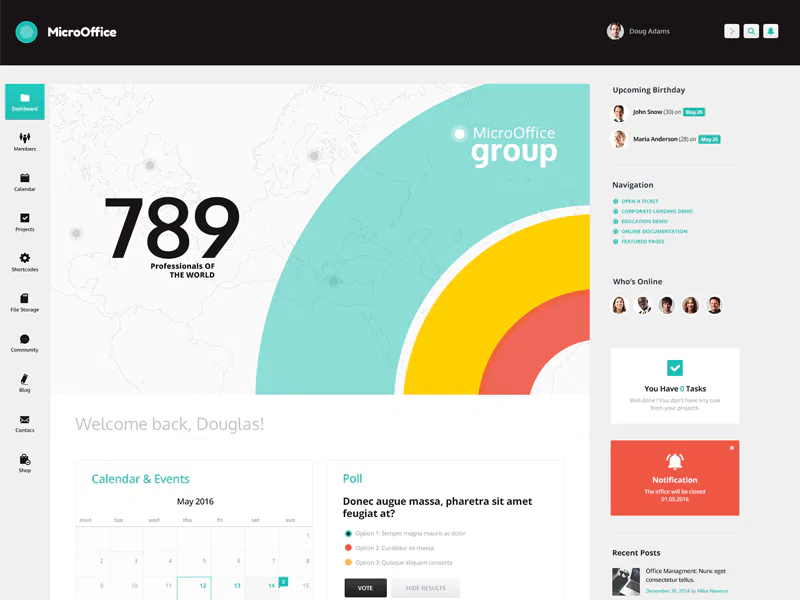
A powerful intranet often connects with other business systems. Here are key integrations to consider:
1. Enterprise Systems Integration
Connect your intranet with core business systems:
ERP Integration
- Pull employee data from your ERP system
- Display relevant business metrics and KPIs
- Link to specific ERP functions
- Consider solutions like WordPress ERP for integrated functionality
CRM Connection
- Show customer information and status updates
- Provide quick access to customer records
- Display sales performance metrics
- Create integrated lead management tools
HR System Integration
- Synchronize employee data
- Enable leave management and time tracking
- Support performance management processes
- Provide benefits enrollment and management
2. Communication Tools Integration
Connect with your organization’s communication platforms:
Microsoft Teams/Slack Integration
- Share intranet content to communication channels
- Provide notifications for intranet activities
- Enable single sign-on between platforms
- Embed communication widgets within the intranet
Email Integration
- Send automated email notifications
- Allow email-to-intranet posting
- Integrate with email newsletters
- Consider using Integrating Constant Contact API with WordPress for newsletter management
Video Conferencing
- Embed Zoom, Teams, or WebEx meeting links
- Schedule and manage virtual meetings
- Record and store meeting content
- Provide virtual event spaces
3. Cloud Storage Integration
Connect with document storage platforms:
Microsoft OneDrive/SharePoint
- Access and edit SharePoint documents
- Sync document libraries
- Maintain consistent permissions
- Enable collaborative editing
Google Drive
- Embed Google Docs, Sheets, and Slides
- Allow direct editing of Google documents
- Sync with Google Drive folders
- Maintain Google Workspace permissions
Dropbox/Box Integration
- Link to cloud storage files
- Maintain version control
- Provide secure file sharing
- Sync file metadata and permissions
4. E-Commerce and Business Tools
For organizations with internal purchasing or business operations:
Internal Store Integration
- Create company stores for branded items
- Implement procurement systems
- Use E-commerce WordPress plugins for internal marketplace functionality
- Integrate with Shipstation for WordPress for fulfillment
Business Intelligence
- Embed BI dashboards and reports
- Display real-time business metrics
- Create data visualization tools
- Enable self-service reporting
Performance Optimization for WordPress Intranets

As your intranet grows, maintaining performance becomes crucial. Implement these optimization strategies:
1. Caching Implementation
Proper caching significantly improves intranet performance:
Page Caching
- Implement page caching with exceptions for dynamic content
- Use plugins like WP Rocket, W3 Total Cache, or LiteSpeed Cache
- Configure separate caching rules for different user roles
- Exclude personalized content from caching
Object Caching
- Implement Redis or Memcached for object caching
- Reduce database query load
- Improve handling of complex queries
- Enhance performance for logged-in users
Browser Caching
- Set appropriate cache headers for static resources
- Implement proper cache invalidation for updates
- Configure browser caching for optimal performance
For a complete optimization strategy, refer to our WordPress Page Speed Optimization guide.
2. Database Optimization
Your intranet’s database requires regular maintenance:
Regular Cleanup
- Remove post revisions (or limit their number)
- Clean up transients and expired data
- Optimize database tables regularly
- Archive old content when appropriate
Query Optimization
- Use query monitoring tools to identify slow queries
- Implement proper indexing for custom tables
- Optimize complex queries in custom plugins
- Consider query caching for repetitive operations
Database Scaling
- For larger intranets, consider database replication
- Implement read/write splitting for heavy loads
- Use database clustering for enterprise-scale implementations
- Consider external database hosting for very large installations
3. Asset Optimization
Optimize your intranet’s assets for faster loading:
Image Optimization
- Implement image compression
- Use appropriate image formats (WebP, SVG where applicable)
- Implement lazy loading for images
- Set correct image dimensions
JavaScript and CSS Optimization
- Minify and combine CSS and JavaScript files
- Implement proper loading order and dependencies
- Use deferred loading for non-critical scripts
- Remove unnecessary scripts and styles
Content Delivery
- Consider an internal CDN for larger organizations
- Optimize file delivery methods
- Implement compression for text-based resources
- Use HTTP/2 or HTTP/3 when available
4. Server Configuration
Optimize your server for intranet performance:
PHP Configuration
- Use the latest stable PHP version
- Optimize PHP memory limits
- Configure PHP opcode caching
- Adjust PHP execution time for document processing
Web Server Tuning
- Configure proper server caching
- Optimize worker processes and connections
- Implement proper resource allocation
- Consider using NGINX for better performance
Hardware Scaling
- Allocate sufficient server resources
- Implement load balancing for larger intranets
- Consider server clustering for enterprise implementations
- Monitor resource usage and scale accordingly
Intranet Governance and Management
A successful intranet requires ongoing governance and management:
1. Content Governance
Establish clear content management processes:
Content Lifecycle Management
- Define content creation workflows
- Establish review and approval processes
- Implement content expiration and archiving
- Create content update schedules
Editorial Guidelines
- Develop style guides for different content types
- Create templates for common documents
- Establish naming conventions
- Define metadata standards
Content Ownership
- Assign content owners for different sections
- Define responsibilities for content maintenance
- Implement accountability for outdated content
- Create escalation procedures for content issues
2. User Training and Adoption
Drive intranet adoption through comprehensive training:
Training Programs
- Create role-based training materials
- Develop video tutorials for common tasks
- Provide regular training sessions
- Implement a help system within the intranet
Adoption Strategies
- Get executive sponsorship and participation
- Recognize and reward active users
- Showcase success stories and use cases
- Gather and implement user feedback
Support Systems
- Provide a helpdesk for intranet issues
- Create an FAQ section for common questions
- Offer peer support through champions or ambassadors
- Implement user feedback mechanisms
3. Measuring Success
Track and evaluate your intranet’s effectiveness:
Key Performance Indicators
- User engagement metrics (logins, time spent, pages viewed)
- Content effectiveness (most viewed, search queries)
- Process improvements (time saved, error reduction)
- Collaboration metrics (comments, shared documents)
Analytics Implementation
- Set up appropriate tracking tools
- Create custom dashboards for intranet metrics
- Establish regular reporting processes
- Use data to drive continuous improvement
User Feedback
- Conduct regular user surveys
- Implement feedback mechanisms within the intranet
- Hold focus groups for in-depth insights
- Create a user advisory committee
Case Studies: Successful WordPress Intranets
Let’s look at some real-world examples of successful WordPress intranet implementations:
Case Study 1: Mid-Size Marketing Agency
Organization: Creative marketing agency with 75 employees across 3 offices
Challenges:
- Disjointed communication across locations
- Inefficient project collaboration
- Inconsistent access to brand assets and templates
WordPress Intranet Solution:
- Custom WordPress multisite implementation
- BuddyPress for team communication
- Project management integration with Asana
- Digital asset management system for brand resources
Results:
- 35% reduction in project delivery time
- Improved cross-office collaboration
- Centralized access to all marketing assets
- Enhanced employee onboarding experience
Case Study 2: Healthcare Provider Network
Organization: Network of healthcare clinics with 200+ staff members
Challenges:
- Compliance with healthcare regulations
- Secure sharing of sensitive information
- Consistent policy implementation across locations
- Staff training and certification tracking
WordPress Intranet Solution:
- Highly secure WordPress implementation with encryption
- Custom document management system with version control
- Training management system with certification tracking
- Policy acknowledgment workflows
Results:
- 100% compliance with documentation requirements
- 45% reduction in policy distribution time
- Improved staff training completion rates
- Secure communication channel for sensitive information
Case Study 3: Manufacturing Company
Organization: Manufacturing company with 500 employees across production and office roles
Challenges:
- Limited computer access for production staff
- Complex approval workflows for production changes
- Equipment documentation management
- Safety procedure distribution
WordPress Intranet Solution:
- Mobile-optimized WordPress intranet for shop floor access
- Kiosk mode for shared computer stations
- Document management system for equipment manuals
- Safety procedure database with search functionality
Results:
- 60% increase in safety procedure compliance
- Reduced equipment downtime through better documentation access
- Streamlined approval processes for production changes
- Improved communication between office and production staff
Common Challenges and Solutions
Building an intranet with WordPress can present specific challenges. Here are solutions to common issues:
Challenge 1: User Management at Scale
Problem: Managing hundreds or thousands of users efficiently
Solutions:
- Implement user import/export tools
- Use LDAP or Active Directory integration
- Create automated user provisioning
- Implement role-based access control
- Use bulk user management plugins
Challenge 2: Document Version Control
Problem: Maintaining proper document versioning and preventing conflicts
Solutions:
- Implement a dedicated document management plugin
- Use check-in/check-out functionality
- Create clear version naming conventions
- Implement approval workflows for document updates
- Consider integration with external version control systems
Challenge 3: Mobile Access
Problem: Providing effective intranet access for mobile users
Solutions:
- Choose a fully responsive theme
- Prioritize mobile-critical features
- Create simplified mobile views for complex tools
- Implement a progressive web app (PWA) approach
- Consider a dedicated mobile app for critical functions
Challenge 4: Search Functionality
Problem: Standard WordPress search is insufficient for intranet needs
Solutions:
- Implement an advanced search plugin like SearchWP or Relevanssi
- Create custom search forms for different content types
- Use faceted search for complex filtering
- Implement search analytics to improve results
- Consider Elasticsearch for enterprise-scale search needs
Challenge 5: Performance with Many Concurrent Users
Problem: Maintaining performance with many simultaneous users
Solutions:
- Implement object caching (Redis/Memcached)
- Use a robust hosting environment
- Optimize database queries and indexing
- Implement load balancing for large user bases
- Consider server clustering for enterprise implementations
Future-Proofing Your WordPress Intranet
Ensure your intranet remains effective and secure for years to come:
1. Sustainable Development Practices
Implement practices that support long-term maintenance:
Code Standards
- Follow WordPress coding standards
- Document custom development thoroughly
- Use version control for all custom code
- Create development guidelines for future work
Modular Architecture
- Build features as modular components
- Avoid tight coupling between systems
- Create clear APIs for internal services
- Implement dependency management
Testing Procedures
- Establish testing protocols for updates
- Implement automated testing where possible
- Maintain a staging environment for testing
- Create rollback procedures for failed updates
2. Scalability Planning
Prepare for organizational growth:
User Scalability
- Design user management for significant growth
- Implement role templates for new departments
- Create onboarding automation for new users
- Plan database scaling for user growth
Content Scalability
- Implement content archiving strategies
- Plan for increased storage needs
- Create content cleanup automations
- Design flexible information architecture
Feature Scalability
- Build extensible feature frameworks
- Create APIs for future integrations
- Document extension points for developers
- Maintain compatibility with emerging standards
3. Technology Evolution
Stay current with evolving technologies:
WordPress Core Updates
- Maintain compatibility with WordPress updates
- Follow WordPress roadmap developments
- Participate in the WordPress community
- Test thoroughly before major version updates
Plugin Ecosystem
- Regularly evaluate plugin alternatives
- Replace abandoned plugins proactively
- Maintain plugin update strategies
- Consider developing critical plugins in-house
Web Technologies
- Implement progressive enhancement approaches
- Stay current with web standards
- Evaluate new technologies for adoption
- Maintain backward compatibility
Conclusion: Building Your WordPress Intranet
Creating an intranet with WordPress offers organizations a flexible, cost-effective solution for improving internal communications, streamlining workflows, and enhancing collaboration. By carefully planning your implementation, selecting the right plugins, implementing proper security measures, and establishing good governance practices, you can build an intranet that truly serves your organization’s needs.
Remember that a successful intranet is never truly “finished.” It should evolve alongside your organization, adapting to changing requirements and incorporating new technologies. Regular user feedback, performance monitoring, and continuous improvement will ensure your WordPress intranet remains a valuable tool for years to come.
At Jackober, we’ve helped organizations of all sizes implement successful WordPress intranets that transform their internal communications and operations. If you’re considering building an intranet with WordPress or need help optimizing an existing implementation, our team of WordPress specialists can provide the expertise you need.
For organizations wondering about WordPress’s capabilities beyond intranets, our guide on How Easy Is It to Build a Website with WordPress? provides insights into the platform’s flexibility for various web projects. And if you encounter any issues with your WordPress intranet, our 15 Easy Fixes for Common WordPress Issues guide can help you troubleshoot effectively.
Building an intranet with WordPress combines the best of both worlds—the flexibility and extensibility of the world’s most popular CMS with the specific features and security needed for internal organizational use. With the right approach, your WordPress intranet can become an indispensable tool that drives productivity, enhances communication, and supports your organization’s success.
1 thought on “How to Build a Powerful Intranet with WordPress: The Complete Guide”