
When WordPress stops sending email, the symptoms are easy to miss: contact form messages never arrive, customers do not get order receipts, and password reset links vanish. The site itself looks fine, which is why the problem can go unnoticed for weeks.
This guide explains why it happens, how to find out where the email is getting lost, and how to fix it properly with SMTP and domain authentication.
The Short Answer
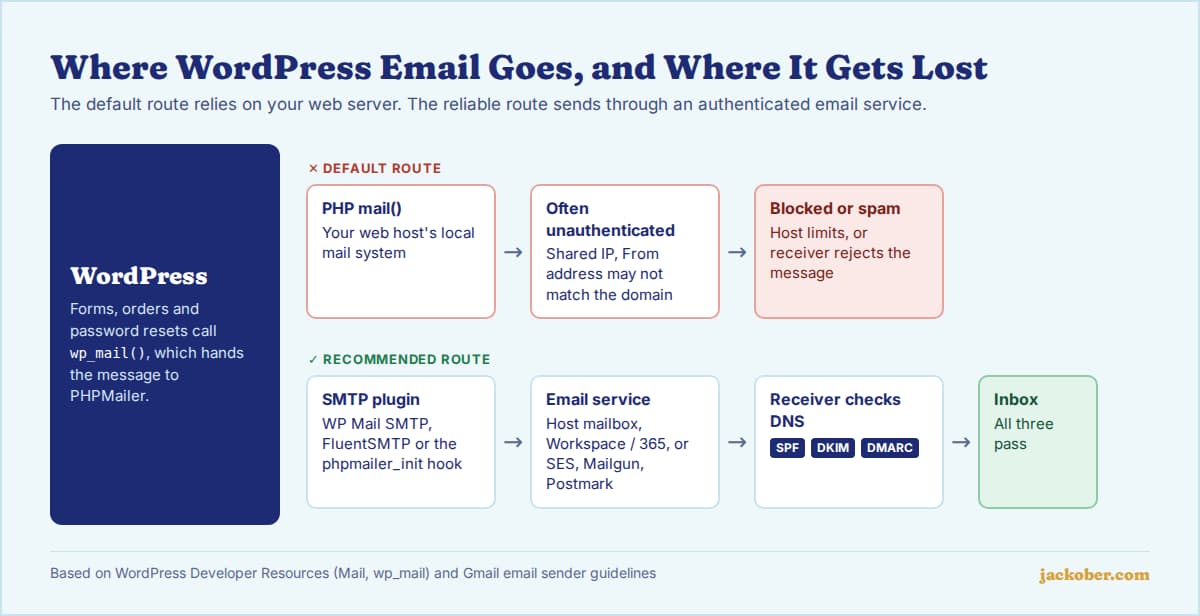
By default, WordPress hands email to PHP’s built-in mail() function on your web server. Many hosts restrict that function, and even when it works, the messages often lack the authentication that Gmail, Yahoo and Outlook now expect, so they are rejected or filtered as spam.
The reliable fix has three parts: send through an authenticated SMTP or email API service using an SMTP plugin, use a From address on your own domain, and publish SPF, DKIM and DMARC records for that domain. Then send a test email and check the headers to confirm all three pass.
Why WordPress Emails Fail
WordPress sends everything through the wp_mail() function, which uses the PHPMailer library. Out of the box, PHPMailer passes the message to the server’s local mail system. Several things can go wrong on that path:
- The host blocks or limits mail(). Some hosts disable it to stop spam from hacked sites, or cap how many messages an account can send per hour.
- The From address does not match the domain. WordPress defaults to
[email protected]. Many form plugins instead put the visitor’s Gmail address in the From field, which fails authentication immediately. - The domain has no authentication records. Since February 2024, Google’s email sender guidelines require every sender to use at least SPF or DKIM, and bulk senders (more than 5,000 messages a day to Gmail) must also publish DMARC. Yahoo’s sender requirements are similar.
- The server’s IP has a poor reputation. On shared hosting, your site shares an IP address with other accounts, and one spammer can hurt everyone’s delivery.
Before changing anything, install an email logging tool such as Check & Log Email and send a test to an address you control. The result points to the cause.
| If you see… | Likely cause | Then do this |
|---|---|---|
| The log shows an error and nothing is sent | mail() is disabled or misconfigured on the server | Set up SMTP (below); ask your host whether outgoing mail is blocked |
| The log says “sent”, but nothing arrives, not even in spam | The receiving server rejected it, usually for failed authentication | Fix the From address and add SPF/DKIM, then switch to SMTP |
| Emails land in the spam folder | Authentication is partial, or IP reputation is poor | Check the message headers for SPF, DKIM and DMARC results; send through a dedicated email service |
| Only contact form emails fail; password resets work | The form plugin sets the visitor’s address as From | Set From to your domain address and put the visitor’s address in Reply-To |
| Emails worked, then stopped after a Gmail password change | Google no longer accepts plain passwords for SMTP | Use an app password or OAuth connection (see below) |
| Some messages arrive, others do not | Hourly sending limits on the host | Move transactional email to a dedicated provider |
How to Fix It: Step by Step
1. Choose how you will send
You have three realistic options. Your host’s own mailbox SMTP is free and fine for a small site with a contact form. A Google Workspace or Microsoft 365 mailbox works if you already pay for one. A transactional email service (such as Amazon SES, Mailgun, Postmark or SendGrid) is the better choice for online stores, membership sites or anything sending more than a few dozen emails a day, because these services are built for deliverability and provide logs.
2. Install an SMTP plugin
An SMTP plugin reroutes wp_mail() through your chosen service. Two widely used free options are WP Mail SMTP (4+ million active installations) and FluentSMTP (700,000+), which both support generic SMTP and the major email APIs. Use only one SMTP plugin at a time; two will fight over the same setting.
3. Set a From address on your domain
Use a real mailbox such as [email protected], and enable the plugin’s option to force this From address for all emails. WordPress’s own documentation recommends that the From domain match your website to avoid spam filtering. In your form plugin, map the visitor’s email to the Reply-To field instead.
4. If you use Gmail, use an app password or OAuth
Google turned off “less secure app” access in 2025, so your normal Google password no longer works for SMTP. Either connect through the plugin’s Google OAuth option or create an app password, which requires 2-Step Verification on the account.
5. Publish SPF, DKIM and DMARC records
These are DNS records added wherever your domain’s DNS is managed. Your email provider gives you the exact values; the checklist below shows what each one does.
- SPF: a single TXT record listing which servers may send for your domain. If you send through several services, combine them in one record; a domain must not have two SPF records.
- DKIM: a public key published in DNS so receivers can verify your messages were signed by your provider.
- DMARC: a TXT record at
_dmarc.yourdomain.comtelling receivers what to do when checks fail. Starting withp=noneis allowed under Google’s rules and lets you monitor reports before enforcing.
6. Test and read the headers
Send a test email from the plugin to a Gmail address, open it and choose “Show original”. You want to see SPF, DKIM and DMARC all marked as PASS. If DMARC fails while SPF passes, the domain in the From address probably does not match the domain your provider uses for sending; check your provider’s domain verification steps.
For Developers: Configuring SMTP Without a Plugin
If you prefer code, WordPress exposes the phpmailer_init hook, which lets you configure PHPMailer directly. Keep credentials out of the database by defining them as constants in wp-config.php.
add_action( 'phpmailer_init', function ( $phpmailer ) {
    $phpmailer->isSMTP();
    $phpmailer->Host       = SMTP_HOST;
    $phpmailer->Port       = 587;
    $phpmailer->SMTPAuth   = true;
    $phpmailer->SMTPSecure = 'tls';
    $phpmailer->Username   = SMTP_USER;
    $phpmailer->Password   = SMTP_PASS;
} );
The trade-off is that you lose the logging and test screens a plugin provides, so pair this with a logging tool while you verify delivery.
Common Mistakes
- Using the visitor’s address as From. It looks convenient in your inbox, but it fails SPF and DMARC for the visitor’s domain. Use Reply-To.
- Adding a second SPF record. Two SPF records make both invalid. Merge them into one.
- Setting DMARC to reject on day one. If any legitimate sender is missing from SPF or DKIM, its mail will be blocked. Start with monitoring.
- Sending newsletters through WordPress mail. Bulk marketing email needs a proper newsletter service with unsubscribe handling, which both Google and Yahoo require for bulk senders.
- Never testing again. Expired API keys and changed passwords break email silently. Re-test after any hosting, DNS or plugin change.
If your forms also attract junk submissions, our guide to WordPress spam prevention methods covers filtering, and our 15 fixes for common WordPress issues covers other everyday problems.
FAQ
Why does my WordPress contact form say “sent” but I get nothing?
The form only confirms that WordPress handed the message to the mail system. Delivery can still fail afterwards, usually because the receiving server rejected an unauthenticated message. An email log plus SMTP usually solves it. Our guide to creating a contact form in WordPress covers form setup itself.
Do I need SMTP if my emails are working?
Not strictly, but it is good insurance. Server mail that works today can be blocked tomorrow by a host policy change or a neighbour on the same IP address. For stores and membership sites, authenticated sending is worth setting up before problems appear.
Is a free Gmail account good enough for sending site email?
For a low-volume personal site it can work, but the From address will be a gmail.com address, not your domain, and Google applies daily sending limits. A mailbox on your own domain or a transactional service is more professional and more reliable.
Why are WooCommerce order emails going to spam?
The causes are the same as for any WordPress email: missing SPF, DKIM or DMARC, a mismatched From address, or a shared server IP with poor reputation. Stores send enough mail that a dedicated provider is usually worth it; see our guide to building an online store with WordPress for the wider setup.
What does DMARC p=none actually do?
It asks receivers to send you reports about messages using your domain but not to block anything. It satisfies the DMARC requirement in Google’s and Yahoo’s sender rules and is the safe first step before moving to quarantine or reject.
The Bottom Line
WordPress email usually fails because server mail is unauthenticated, not because WordPress is broken. Log a test message to see where it fails, send through an SMTP plugin with a From address on your domain, and publish SPF, DKIM and DMARC. Once the headers show three passes, your forms, receipts and password resets should arrive reliably.
Sources & Further Reading
- WordPress Developer Resources: Mail
- WordPress Developer Resources: wp_mail()
- WordPress Developer Resources: phpmailer_init
- Gmail Help: Email sender guidelines
- Yahoo Sender Hub: Best practices
- Google Account Help: Less secure apps
- Google Account Help: Sign in with app passwords
- WP Mail SMTP on WordPress.org
- FluentSMTP on WordPress.org
- Check & Log Email on WordPress.org
Jackober uses AI tools for research, drafting, and editing. Articles are editorially reviewed and factual claims are checked against cited sources. Last reviewed: October 2026.