
WordPress now has two ways to build a theme. Classic themes use PHP template files and the Customizer, as they have for almost twenty years. Block themes are built entirely from blocks and are edited visually in the Site Editor. Both are fully supported, which makes the choice confusing when you are picking a theme or planning a redesign.
This guide explains how the two approaches differ, how to tell which one you have, and how to decide between them.
The Short Answer
A block theme builds every part of the site, including the header, footer and templates, from blocks, so you can edit the whole design in the Site Editor without code. A classic theme uses PHP templates and the Customizer, and its layout is changed mainly through theme options or code.
For a new site with standard needs (a blog, portfolio or small business site), a block theme is the better default in 2026: it is where WordPress core development is focused, and the current default theme, Twenty Twenty-Five, is a block theme. Stay with a classic theme if your current site works well, depends on plugins that require the Customizer or PHP templates, or was custom-built around them. There is no need to switch a working site just because block themes exist.
What Is the Technical Difference?
According to the Block Editor Handbook, a block theme has, at minimum, an index.html template in its /templates folder, written in block markup. A classic theme defines its templates as .php files instead. WordPress itself uses this rule: the wp_is_block_theme() function checks for that HTML template.
Most block themes also include a theme.json file that defines colours, typography, spacing and layout settings in one place. It is not strictly required, and classic themes can use it too, as the Theme Handbook’s theme.json introduction explains.
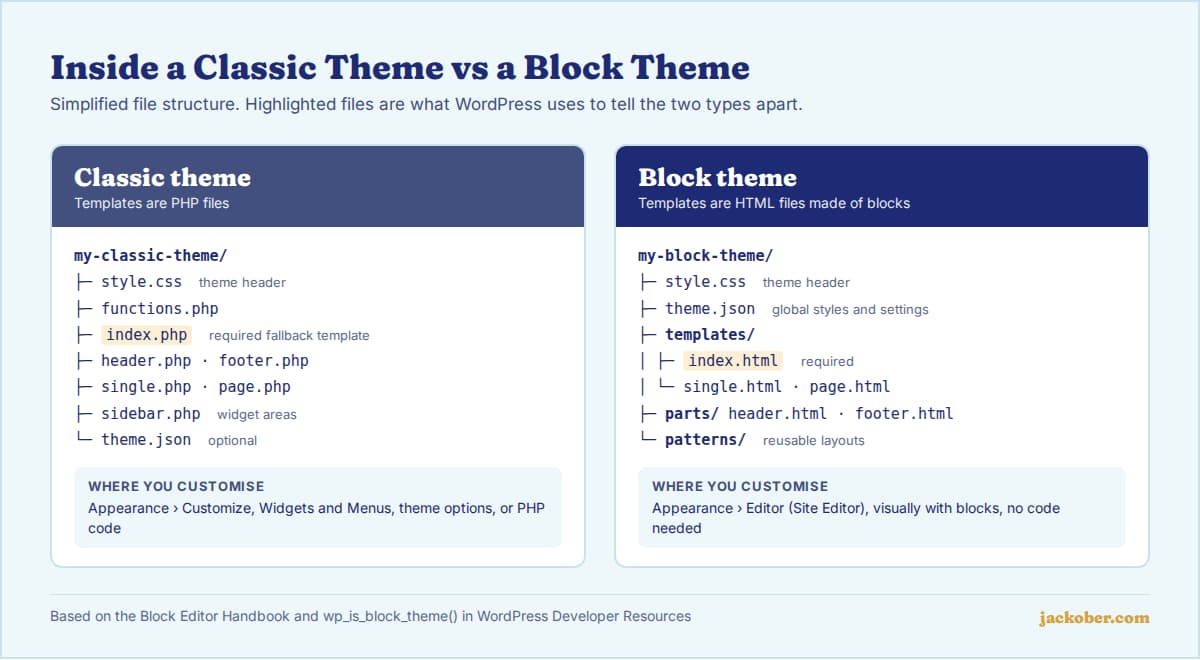
| Factor | Block theme | Classic theme |
|---|---|---|
| Templates | HTML files with block markup | PHP files |
| Where you customise | Appearance > Editor (Site Editor) | Appearance > Customize, widgets, menus, theme options |
| Header and footer editing | Visual, with blocks | Depends on the theme’s options, or code |
| Global styles | Built in, through theme.json and the Styles panel | Theme-specific; theme.json support is optional |
| Widgets and menus screens | Replaced by blocks (Navigation block, template parts) | Available |
| Plugin compatibility | Most plugins work; some older ones expect the Customizer or widget areas | Broadest compatibility with older plugins |
| Who it suits | Site owners who want visual control without code | Existing sites, custom PHP builds, heavily plugin-dependent setups |
| Direction of core development | Primary focus of new editor features | Still supported; some block features are being brought to classic themes |
How to Check Which Type of Theme You Have
The quickest check, as described in a Learn WordPress tutorial, is the Appearance menu in your dashboard:
- You see “Editor”: you are most likely using a block theme.
- You see “Customize” but no “Editor”: you are using a classic theme.
- You see both: you may have a hybrid theme, or a plugin that still needs the Customizer.
The Middle Ground: Hybrid Themes
The line between the two types is not absolute. The WordPress Developer Blog describes hybrid themes as classic themes that adopt selected block features, such as a theme.json file or block-based template parts enabled with add_theme_support( 'block-template-parts' ). Classic themes have also had access to the Patterns screen under Appearance since WordPress 6.5.
Hybrid themes are a practical route for teams with a large classic codebase: they can move one piece at a time instead of rebuilding everything.
Decision Guide: Which Should You Choose?
| If your situation is… | Then choose… | Why |
|---|---|---|
| A new blog, portfolio or brochure site | Block theme | Full visual control of every template, no page builder needed |
| An existing classic site that works and ranks well | Stay classic | A theme switch is a redesign; it carries risk with no guaranteed gain |
| A site built around a page builder such as Elementor or Divi | Usually stay with the builder’s recommended theme | The builder already controls the layout; mixing systems adds complexity |
| A large custom theme maintained by developers | Hybrid, then migrate gradually | Adopt theme.json and block template parts without a rewrite |
| A plugin you rely on needs widget areas or the Customizer | Classic, or test carefully on staging | Compatibility matters more than the editing model |
| You want to build your own theme without writing PHP | Block theme | Tools like Create Block Theme let you design in the editor and export |
Performance: Is One Faster?
Neither type is automatically faster; theme quality, plugins and hosting matter more. There is one structural difference. With block themes, WordPress knows which blocks a page uses before rendering, so it loads only the styles for those blocks in the page head. In classic themes, block styles that load on demand are added later, in the footer, because WordPress only discovers the blocks while rendering.
In practice, measure your own pages rather than relying on the theme type. Our WordPress page speed guide covers what to test.
Switching From Classic to Block: A Checklist
- Back up the site and set up a staging copy.
- List what your current theme provides: widget areas, menus, custom page templates, shortcodes and theme-specific settings.
- Install the block theme on staging and rebuild the header, footer and navigation in the Site Editor.
- Check every template: home, single post, page, archive, search and 404.
- Test plugins that add output to the front end, such as forms, ads and related posts.
- Compare page speed and Core Web Vitals before and after.
- Confirm that SEO settings, structured data and permalinks are unchanged, then go live.
If you only want to adjust a classic theme rather than replace it, a child theme is the safer route.
Common Mistakes
- Switching themes on a live site. Widgets, menus and theme options do not carry over automatically. Always switch on staging first.
- Assuming classic themes are deprecated. They remain supported in core, and many established sites will run on them for years.
- Stacking a page builder on a block theme without a reason. You end up with two layout systems to maintain.
- Editing templates in the Site Editor, then updating the theme and expecting changes to be in the files. Site Editor changes are saved in the database; export them (for example with Create Block Theme) if you need them in code.
FAQ
Will classic themes stop working?
There is no announced end date. The Theme Handbook documents both classic and block themes, and recent releases have added block features to classic themes rather than removing classic support.
Is Twenty Twenty-Five a block theme?
Yes. Twenty Twenty-Five, the default theme since WordPress 6.7, is a block theme with multiple style variations and a large set of patterns.
Do I still need a page builder with a block theme?
Often not. The Site Editor, patterns and global styles cover many layouts that previously required a builder. Builders still offer more design widgets and finer control; our comparison of WordPress page builders covers the trade-offs.
Can I create a child theme of a block theme?
Yes. The Create Block Theme plugin can generate a child theme of the active block theme, as well as a blank theme or a copy of the current one.
Does switching to a block theme affect SEO?
The theme type itself does not affect rankings. A switch can affect SEO indirectly if headings, internal links, structured data or page speed change, which is why the staging checklist above includes checking them.
The Bottom Line
Block themes are the modern default and the right starting point for most new WordPress sites in 2026. Classic themes remain a sound choice for established sites, custom PHP builds and plugin-heavy setups. If you are browsing for a new design, our list of free WordPress themes for blogs is a useful starting point; whichever type you pick, test it on staging before switching.
Sources & Further Reading
- Block Editor Handbook: What Is a Theme?
- WordPress Theme Handbook
- Theme Handbook: Introduction to theme.json
- Developer Reference: wp_is_block_theme()
- WordPress Developer Blog: Bridging the gap, hybrid themes
- Learn WordPress: What kind of theme do I have?
- Developer Reference: wp_should_load_separate_core_block_assets()
- Twenty Twenty-Five on WordPress.org
- Create Block Theme on WordPress.org
Jackober uses AI tools for research, drafting, and editing. Articles are editorially reviewed and factual claims are checked against cited sources. Last reviewed: October 2026.