
Originally published: April 5, 2025 · Last reviewed and updated: October 2026
An appointment booking plugin lets clients see your availability and book a time on your WordPress site, without emails or phone calls back and forth. Most plugins also send reminders, sync with your calendar, and can take payments, which cuts no-shows and admin work.
This guide compares the best WordPress appointment booking plugins in 2026, explains what each one is good for, and shows how to choose and set one up.
The Short Answer
| Plugin | Free version | Best for |
|---|---|---|
| Amelia | Yes (Lite) | Businesses with several staff, services, or locations |
| Bookly | Yes, limited; Pro add-on for more | Businesses that want to add features one by one |
| Simply Schedule Appointments | Yes (Basic) | Solo professionals and small teams who want a simple setup |
| Easy Appointments | Yes, core is free | Simple bookings on a tight budget |
| Booking Calendar | Yes | Date-based bookings such as rentals and rooms |
| WooCommerce Bookings | No, paid extension | WooCommerce stores that sell bookable services |
All of these have free versions except WooCommerce Bookings. Online payments, calendar sync, and multi-staff features are often in the paid tiers, so check the current feature list for each plan before choosing. Prices change often, which is why we don’t list them here.
What to Look For
- Booking flow. Clients should be able to pick a service, time, and staff member in a few steps on a phone.
- Availability rules. Working hours, breaks, buffers between appointments, and limits on how far ahead people can book.
- Calendar sync. Two-way sync with Google Calendar or Outlook prevents double-booking.
- Notifications. Email confirmations and reminders, plus SMS if your clients prefer it.
- Payments. Deposits or full payment through Stripe, PayPal, or WooCommerce. See our guide to payment gateways for WordPress.
- Staff and locations. Separate schedules for each team member or branch.
- Time zones. Important if you meet clients online in other countries.
The Best WordPress Appointment Booking Plugins
1. Amelia
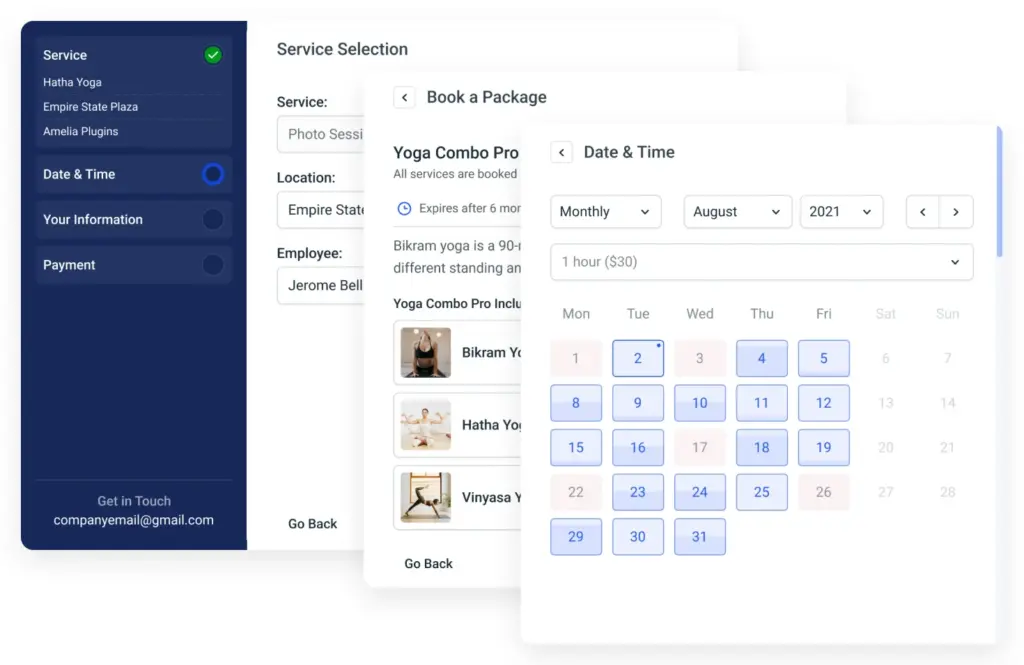
Amelia offers a polished step-by-step booking form for services and events. The free Lite version covers basic appointments and events, and it prevents double-booking. Paid plans add online payments, more integrations, and advanced features for teams and locations.
- Good for: salons, clinics, studios, and agencies with several staff members.
- Watch out for: many business features are only in paid plans.
2. Bookly
Bookly is a long-running booking plugin with a free core. The free version limits staff and services and has no online payments. The paid Bookly Pro add-on removes those limits and lets you install further add-ons, such as recurring appointments or customer accounts, when you need them.
- Good for: businesses that want to build up their booking system over time.
- Watch out for: costs can add up if you need several add-ons, and the developer gives priority support to paying customers.
3. Simply Schedule Appointments
Simply Schedule Appointments focuses on a clean, simple setup. The free Basic edition lets you create unlimited appointment types. Paid editions add team booking, Stripe and PayPal payments, and Google Calendar sync.
- Good for: coaches, consultants, and small teams.
- Watch out for: calendar sync and payments need a paid edition.
4. Easy Appointments

Easy Appointments is a lightweight plugin whose core is free. It handles services, workers, and locations, and paid extensions add Google Calendar sync, SMS reminders, and online payments.
- Good for: small businesses with straightforward scheduling and a tight budget.
- Watch out for: fewer built-in features and a simpler look than premium plugins.
5. Booking Calendar

Booking Calendar is one of the oldest booking plugins for WordPress. It shows availability on a calendar and is well suited to date-based bookings, such as holiday rentals, rooms, or equipment. Paid versions add time slots, payments, and more options.
- Good for: rentals and other bookings by day.
- Watch out for: the admin area looks dated next to newer plugins.
6. WooCommerce Bookings
WooCommerce Bookings is the official paid extension for selling bookable products in a WooCommerce store, such as appointments, classes, or rentals. It supports resources, availability rules, and Google Calendar sync, and uses WooCommerce checkout for payments.
- Good for: stores that already run on WooCommerce. See our guide to the best e-commerce plugins for WordPress.
- Watch out for: it requires WooCommerce and is paid only.
How to Choose
- Solo professional: Simply Schedule Appointments or Easy Appointments.
- Team or several locations: Amelia or Bookly.
- Rentals and day bookings: Booking Calendar.
- Already selling with WooCommerce: WooCommerce Bookings.
Install your top choice on a staging site first and make a few test bookings from a phone before going live.
Setting Up Your Booking System
- Plan your services: names, durations, prices, and buffer times.
- Set availability: working hours, days off, and how far ahead clients can book.
- Connect your calendar so personal events block booking slots.
- Write clear notifications with the date, time, time zone, location or video link, and how to cancel.
- Add the booking form to a dedicated page and link to it from your menu.
- Test everything: booking, rescheduling, cancelling, reminders, and payments.
Booking emails rely on WordPress mail, so set up SMTP first. Our guide on WordPress not sending emails explains how.
Security, Privacy, and Speed
Booking forms collect names, contact details, and sometimes health or payment information. Keep the plugin updated, serve the site over HTTPS, limit who can see bookings with the right user roles, and explain your data use in your privacy policy. Follow our WordPress security best practices and keep regular backups.
Booking pages show live availability, so exclude them from full-page caching if slots look out of date. Our guide to WordPress cache plugins explains how to exclude pages.
Common Mistakes
- Skipping buffer times. Back-to-back appointments leave no time to prepare or travel.
- No reminders. Automatic reminders are one of the easiest ways to reduce no-shows.
- Ignoring time zones. Online clients may book the wrong hour.
- Caching the booking page. Visitors may see slots that are already taken.
- Collecting more data than needed. Ask only for what the appointment requires.
FAQ
What is the best free appointment booking plugin for WordPress?
Amelia Lite, Bookly, Simply Schedule Appointments, and Easy Appointments all have free versions. Choose based on whether you need multiple staff, calendar sync, or payments, since these are often paid features.
Can clients pay when they book?
Yes, with most plugins, though online payments are usually a paid feature. WooCommerce Bookings uses the normal WooCommerce checkout.
Can a booking plugin sync with Google Calendar?
Most can, but in many plugins two-way sync is part of a paid plan. Check the plugin’s feature list before you buy.
Do I need WooCommerce for bookings?
No. Only WooCommerce Bookings requires it. The other plugins in this list work on their own.
Will a booking plugin slow down my site?
A well-built plugin loads mainly on the booking page. Test page speed after installing, and exclude booking pages from caching if needed.
The Bottom Line
The best WordPress appointment booking plugin depends on your business. Simply Schedule Appointments and Easy Appointments suit solo professionals, Amelia and Bookly suit teams, Booking Calendar suits day-based rentals, and WooCommerce Bookings suits existing stores. Start with the free version, test the whole booking flow, and upgrade only for the features you need.
Sources & Further Reading
- WordPress.org: Amelia
- WordPress.org: Bookly
- WordPress.org: Simply Schedule Appointments
- WordPress.org: Easy Appointments
- WordPress.org: Booking Calendar
- WooCommerce: WooCommerce Bookings
Articles are editorially reviewed by Jackober and factual claims are checked against cited sources.